Education
5 min read

Intelligent Document Processing in Healthcare: A Practical Guide
Published on
September 25, 2026
Intelligent document processing in healthcare on a violet Lyrebird Health background
Contributors
Lyrebird Health
Subscribe to our newsletter
Read about our privacy policy.
Thank you! Your submission has been received!
Oops! Something went wrong while submitting the form.

Healthcare documents arrive in many forms: referral letters, pathology reports, discharge summaries, consent forms, scanned records and PDFs attached to email. Before the information can support care, someone has to identify the document, connect it to the right patient, check it and file it where the clinical team will find it.

Intelligent document processing in healthcare can reduce the manual work in that chain. It combines document capture, text recognition and machine learning with business rules and human review. The goal is not simply to read a PDF. It is to move a trustworthy document and its useful data into the correct clinical workflow.

This guide explains how healthcare document processing works, where patient matching and validation fit, and how an Australian clinical administration team can implement it safely.

What is intelligent document processing in healthcare?

Intelligent document processing (IDP) is a workflow for receiving documents, classifying them, extracting information, validating the result and sending it to another system or work queue. It can process structured forms as well as semi-structured and unstructured files such as letters, reports and scanned pages.

IDP usually brings together several technologies:

  • Optical character recognition (OCR) converts printed content, and in some systems handwriting, from an image into machine-readable text.
  • Computer vision detects page layouts, tables, checkboxes, signatures and other visual features.
  • Machine learning helps classify documents and locate fields even when layouts vary.
  • Natural language processing can identify information inside narrative text.
  • Workflow rules decide what to check, where to route a document and when a person must intervene.

Microsoft's IDP framework describes a similar flow from receipt and extraction through validation, export and monitoring. Hyland's healthcare overview adds document separation and classification as explicit steps, while XBP Global's healthcare overview contrasts the wider workflow with text recognition alone. These are useful workflow models, but they are vendor guidance rather than independent evidence of clinical outcomes.

IDP is more than OCR

OCR answers a narrow question: what characters appear on this page? IDP tries to answer workflow questions as well: what kind of document is this, which information matters, which patient does it concern, and where should it go?

Capability OCR Intelligent document processing
Converts an image to text Yes Usually uses OCR as one component
Identifies document type Not by itself Yes, using models or rules
Extracts named fields Limited without extra configuration Yes
Matches a patient record No Can propose a match using approved rules
Validates and routes work No Yes, with rules and human review
Learns from reviewed exceptions No Possible, depending on the system

OCR quality still matters. A blurred fax, faint scan, handwriting or complex multi-column report can reduce extraction accuracy. IDP does not make a poor source document reliable. It adds checks and exception handling around the extraction.

How healthcare document processing works

A useful IDP design treats the document as part of a clinical information pathway, not an isolated file. The exact stages vary by organisation, but the following seven-step model covers the core workflow.
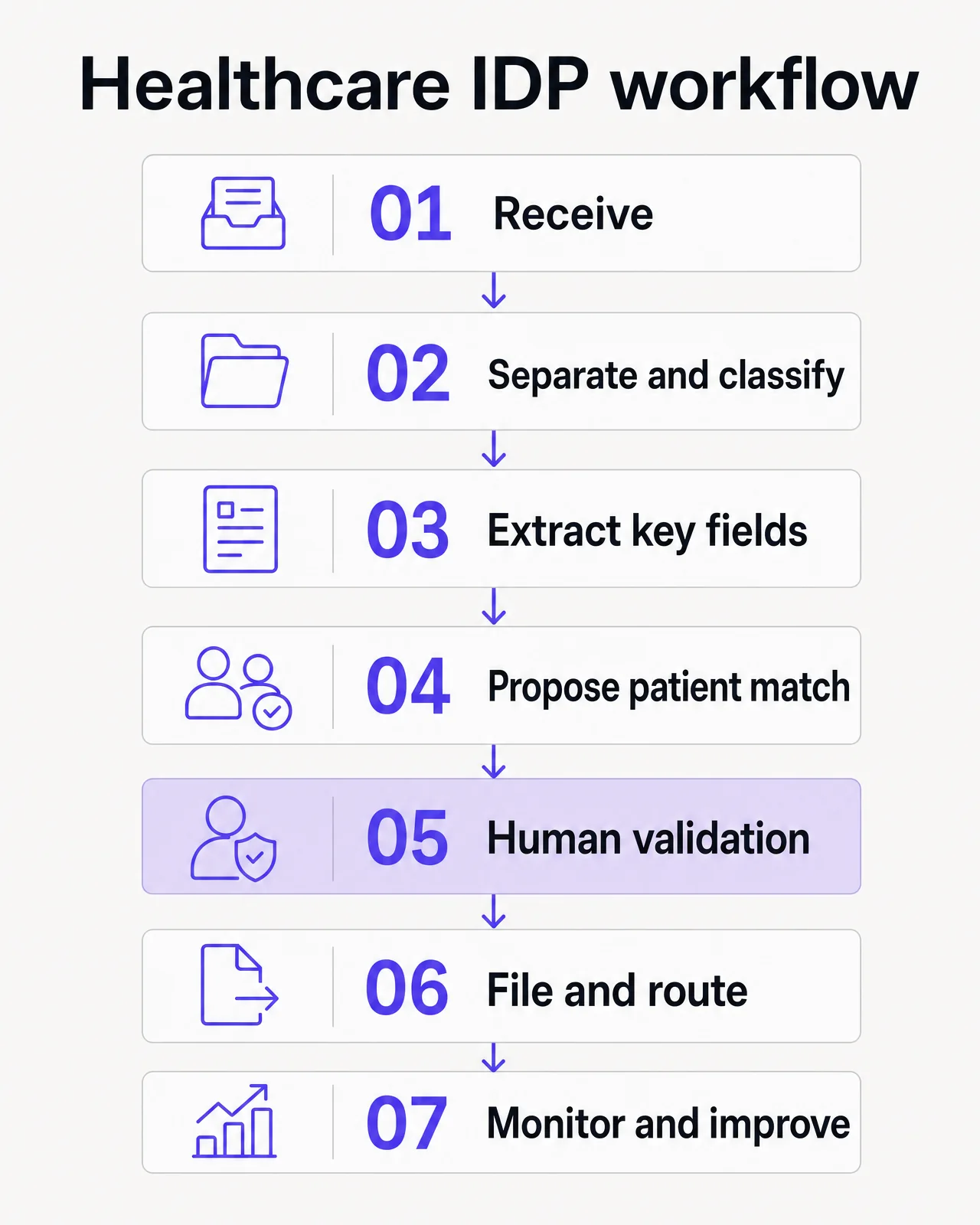
Healthcare IDP workflow: receive, separate and classify, extract, propose a patient match, validate, file and monitor

Human validation sits before clinical filing, while monitoring should improve the full workflow.

1. Capture the document

Documents may enter through a scanner, secure upload, designated email address, desktop folder, fax service, patient portal or system integration. Capture should preserve the original file and record where it came from.

At this stage, define which channels are approved, who can access them and how temporary copies are controlled. A shared inbox with unclear ownership can simply move the backlog rather than solve it.

For a paper archive project, start with our separate guide to scanning medical records. Scanning creates the digital image. IDP acts on that image after capture.

2. Separate and classify it

A batch scan or long PDF may contain several documents. The system first needs to find the boundaries, then assign each item to a controlled category such as:

  • specialist correspondence
  • pathology or imaging report
  • hospital discharge summary
  • referral
  • consent form
  • insurance or administrative form
  • historical clinical record

Classification determines the extraction template, destination and review rules. Keep the taxonomy small enough for staff to apply consistently. If two categories lead to the same workflow and retention treatment, a separate label may not add value.

3. Extract the information that drives the workflow

The system converts relevant content into structured fields. Depending on the document, these may include:

  • patient name and date of birth
  • internal patient or medical record number
  • document date and type
  • source organisation or author
  • intended clinician or service
  • referral details
  • form status, such as signed or incomplete

Extract only what the next step needs. Collecting every possible field increases the validation burden and creates more sensitive structured data to govern.

4. Propose a patient match

Patient matching is a safety-critical step. A correct extraction can still cause harm if the document is attached to the wrong record.

A matching service typically normalises the extracted identity data, searches the clinical system and scores possible records against several approved attributes. The workflow should then:

  1. accept only candidates that meet the organisation's documented matching rules
  2. send ambiguous, conflicting or incomplete results to an exception queue
  3. show the reviewer the source document and the candidate record together
  4. prevent a low-confidence guess from becoming a silent misfile
  5. log who confirmed or changed the match

Do not design the process around one field such as name alone. Duplicate names, changed details, transcription errors and incomplete referrals are routine. For health service organisations in scope, the National Safety and Quality Health Service Communicating for Safety Standard provides patient-identification requirements for specified care and documentation activities. It does not prescribe an IDP algorithm, so each organisation still needs an approved matching policy for its document workflow.

5. Validate the document and extracted data

Validation should test more than whether a field has been populated. A safe design checks different failure modes separately.

Validation layer Questions to ask
File quality Is the document legible, complete, upright and in the correct page order?
Classification Is this the right document type and workflow?
Extraction Do key fields agree with the source image? Are dates and identifiers in valid formats?
Patient matching Do the approved identifiers support this candidate record? Are there conflicts or duplicates?
Workflow Is a signature, referral detail or responsible clinician missing?
Clinical risk Could an error affect care, follow-up or a time-sensitive result?

Confidence scores can help decide what receives more review, but a score is not proof. Thresholds should be tested against the organisation's own document mix. Field-level thresholds are often more useful than one document-level score because an incorrect patient identifier is more consequential than an imperfect subject line.

Human review remains important for low-confidence results, unusual formats and information that could influence clinical decisions. The reviewer should be able to correct the classification, extracted fields and proposed match without re-entering the whole document.

6. File and route it

Once validated, the workflow sends the document and approved metadata to the electronic medical record (eMR), practice management system, billing system or another work queue. Filing should preserve:

  • the original document or accepted source image
  • the confirmed patient record
  • a consistent document category and date
  • the source and responsible clinician where relevant
  • the review or inbox destination
  • an audit record of extraction, changes and final delivery

Filing is not complete just because an interface reports success. The pilot should confirm that authorised staff can retrieve the document in the destination system and that failed transfers are visible and recoverable.

7. Monitor exceptions and improve the workflow

IDP needs ongoing quality assurance. Document layouts change, referral sources adopt new templates and scanners produce new artefacts. Monitor performance by document type and source rather than relying on one overall accuracy figure.

Useful measures include:

  • correct classification rate
  • correct patient-match rate after review
  • field correction rate by data type
  • percentage of documents sent to an exception queue
  • time from receipt to availability in the patient record
  • failed or duplicate filing rate
  • misfiles and near misses
  • reviewer time per document
  • backlog size and age

Review a sample of accepted documents as well as exceptions. Otherwise, a confidently wrong result may never reach the quality team.

Where IDP can help clinical administration teams

Healthcare document processing is most useful when a high-volume document type follows a stable route but still requires judgement at defined points.

Common examples include:

  • Incoming referrals: identify the patient and referrer, extract routing details, flag missing information and send the document to the appropriate queue.
  • Specialist letters and discharge summaries: classify the correspondence, propose a patient match and route it for clinician review before final filing.
  • Pathology and imaging documents: extract administrative metadata and direct the report into an approved results workflow. IDP should not replace the organisation's clinical review, escalation or acknowledgement process.
  • Patient intake and registration forms: capture demographics and form status, then ask staff to resolve conflicts before updating the patient record.
  • Consent and administrative forms: identify the form type and whether required sections appear complete. The system should not infer valid consent from a signature image alone.
  • Historical record digitisation: separate, label and index scanned documents so clinicians can retrieve them. Preserve the accepted source image and apply project-specific quality checks.
  • Claims and billing support: extract fields and route exceptions, while keeping coding, eligibility and claim approval within the relevant governance process.

Start with a workflow where the value and risk are both measurable. A predictable stream of specialist correspondence may make a better first pilot than a mixed archive containing handwriting, damaged pages and decades of changing formats.

How to implement IDP in an Australian healthcare setting

When implementing intelligent document processing, healthcare requirements change the design. Privacy, patient identification, clinical governance and record integrity cannot be added after the automation is built.
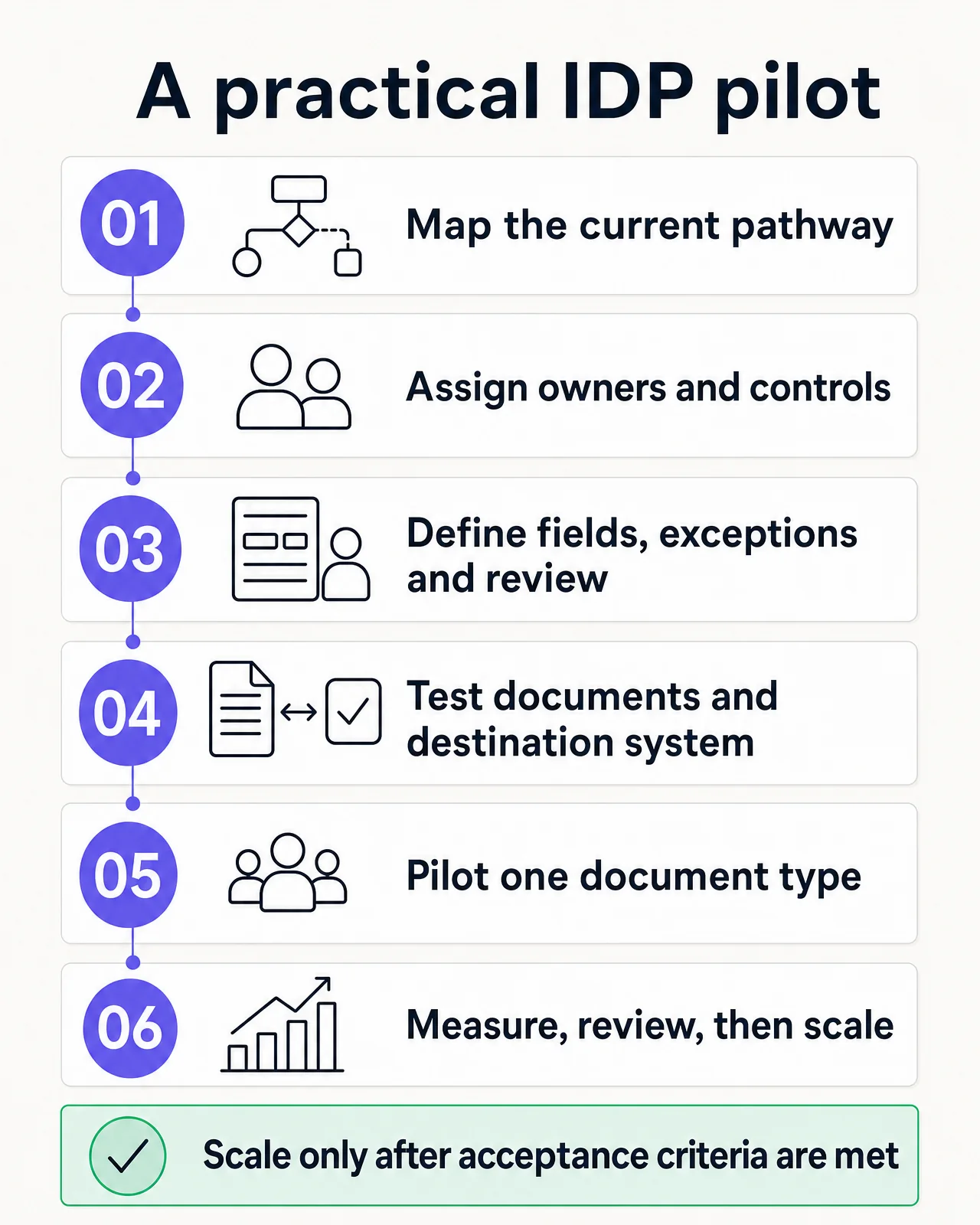
Healthcare IDP pilot: map the pathway, govern, define review and exceptions, test documents and systems, pilot, measure and scale

Start with one controlled document type and scale only after the pilot meets agreed acceptance criteria.

1. Map the current pathway

Follow representative documents from arrival to retrieval in the patient record. Record every hand-off, re-keyed field, queue, delay, duplicate copy and exception. Include workarounds that are not in the formal procedure.

Set a baseline before automating. Measure volume, backlog, processing time, correction rate and known misfiles or near misses for the chosen document type.

2. Assign governance and decision rights

Name an operational owner, clinical safety lead, privacy or information-governance owner and technical owner. Agree who can change classifications, thresholds and filing rules, and who reviews incidents.

Australian privacy law places strict controls on how health service providers handle health information. The Office of the Australian Information Commissioner's health information guidance is a starting point, but practices must also assess their specific obligations, contracts and applicable state or territory requirements. For personal information covered by the Australian Privacy Principles, APP 11 guidance explains the reasonable steps expected to protect information from misuse, interference, loss and unauthorised access, modification or disclosure.

3. Define the minimum data and controls

Create a small document taxonomy, a field list for each type and an exception matrix. For each field, decide:

  • why it is needed
  • its destination
  • acceptable formats
  • the confidence or rule that triggers review
  • who can correct it
  • how the correction is audited

Also define access roles, authentication, storage and processing locations, encryption, logging, retention, deletion, incident response and subcontractor controls. A vendor's broad security claim is not a substitute for testing the actual document route.

4. Build human review into the normal workflow

Do not treat review as a temporary step that will disappear once the model improves. Define which decisions may progress automatically, which always need confirmation and which require a clinician rather than an administrator.

Make exceptions easy to understand. A reviewer should see why the system paused, which fields conflict and what will happen after confirmation. Unsafe automation often hides uncertainty; a safe workflow makes it visible.

5. Integrate with the destination system

Test the complete route, not only extraction accuracy. Confirm patient lookup, permissions, document categories, inbox routing, duplicate handling, retries, audit events and recovery after an outage.

Use a representative test set that includes poor scans, changed patient details, duplicate names, multi-patient batches, missing pages and unexpected layouts. Keep test health information de-identified or properly controlled.

6. Pilot, measure and scale gradually

Run one document type with a defined group of users and an explicit rollback path. During the pilot, reconcile every transfer and review failures daily. Compare the outcome with the baseline and look for risk shifting, such as faster capture but a larger clinician inbox.

Expand only after the team can explain the results by document type, confidence band and exception reason. Corrections can improve models and rules, but each material workflow change should be re-tested before wider use.

What Lyrebird supports today

For practices using Bp Premier, our Document Sorter supports one part of the inbound workflow. It accepts documents through a designated email address, desktop folder or direct upload, including batches. It extracts patient name, date of birth and clinician with field-level confidence scores, proposes a match in Bp Premier, and generates a subject and category.

A staff member reviews and confirms the result before filing. The document can then go to the Doctor's Inbox or patient record, and each send is recorded in an audit trail. This is a review-first filing workflow. It does not perform physical scanning, remove the need for governance or make clinical decisions from the document.

Our Documents & Letters capability addresses a related but different workflow: creating outgoing referrals, certificates, reports and forms from the clinical note and patient context. Keeping incoming document processing and outgoing document generation distinct helps teams apply the right checks to each.

Questions to ask an IDP vendor

Before choosing a platform, ask for answers that relate to your documents and systems:

  • Which input channels, file types, handwriting and layouts are supported?
  • How does the system separate documents and manage mixed-patient batches?
  • Which patient fields are used for matching, and how are conflicts handled?
  • Are confidence scores available per field?
  • Can staff see and correct the source, extraction, classification and match in one review step?
  • What prevents a low-confidence or duplicate result from being filed?
  • Which eMR or practice systems can receive the document, metadata and audit events?
  • Where is health information processed and stored, and which subprocessors can access it?
  • How are role-based access, encryption, logging, backup, retention and deletion handled?
  • Can the organisation export its documents, metadata and audit history?
  • How is performance measured after deployment, and how are model or rule changes governed?

Ask vendors to demonstrate these controls using representative de-identified documents. A polished demo on one clean template reveals little about everyday exceptions.

Frequently asked questions

Can IDP file healthcare documents without human review?

Technically, some systems can automate selected high-confidence steps. Whether they should depends on the document, patient-matching policy, destination and consequence of an error. A risk-based design keeps human confirmation for ambiguous matches, clinically important information and exceptions, with monitoring of accepted results as well.

How accurate is intelligent document processing?

There is no meaningful universal accuracy rate. Results vary by document type, image quality, field, language, layout and whether the measure includes human validation. Ask for field-level results on your test set and separate automated performance from accuracy after human review. Broad vendor percentages without a sample, method and error definition should not drive a clinical workflow decision.

Can IDP process handwriting and poor-quality faxes?

It may extract some information, but reliability is usually lower and more variable than for clean printed text. Route difficult inputs to review and keep the source image available. Do not let uncertain extraction determine patient matching or care without the required verification.

Does IDP replace clinical administrators or health information managers?

No. It can remove repetitive opening, re-keying, categorising and routing work. People still design the taxonomy, resolve identity conflicts, assess exceptions, govern records and improve the process. The best implementation uses automation to focus human attention where context and accountability matter.

A safer document flow starts with the workflow

Intelligent document processing in healthcare is valuable when it makes information available to the right team without weakening patient matching, review or auditability. Extraction is only one stage. Classification, validation, exception handling and reliable filing determine whether the result is useful in care.

Start with one document stream, define the safety boundaries and measure the whole pathway. If your practice uses Bp Premier and wants to review how incoming document sorting could fit its current process, Contact us.
More Resources
Continue reading
Posts
The dangers of Copy Paste Scribes
Read More
Posts
How to use an AI medical scribe
Read More
Posts
December Product Updates
Read More
Education
Patient Communication Software: A Buyer’s Guide for Australian Clinics
Read More
Education
Best medical dictation software for Mac in Australia
Read More
Education
New Patient Form Template for Australian Medical Practices
Read More
Post
5 min read

Intelligent Document Processing in Healthcare: A Practical Guide

Published on
September 25, 2026
Intelligent document processing in healthcare on a violet Lyrebird Health background
Contributors
Lyrebird Health
Subscribe to our newsletter
Read about our privacy policy.
Thank you! Your submission has been received!
Oops! Something went wrong while submitting the form.

Healthcare documents arrive in many forms: referral letters, pathology reports, discharge summaries, consent forms, scanned records and PDFs attached to email. Before the information can support care, someone has to identify the document, connect it to the right patient, check it and file it where the clinical team will find it.

Intelligent document processing in healthcare can reduce the manual work in that chain. It combines document capture, text recognition and machine learning with business rules and human review. The goal is not simply to read a PDF. It is to move a trustworthy document and its useful data into the correct clinical workflow.

This guide explains how healthcare document processing works, where patient matching and validation fit, and how an Australian clinical administration team can implement it safely.

What is intelligent document processing in healthcare?

Intelligent document processing (IDP) is a workflow for receiving documents, classifying them, extracting information, validating the result and sending it to another system or work queue. It can process structured forms as well as semi-structured and unstructured files such as letters, reports and scanned pages.

IDP usually brings together several technologies:

  • Optical character recognition (OCR) converts printed content, and in some systems handwriting, from an image into machine-readable text.
  • Computer vision detects page layouts, tables, checkboxes, signatures and other visual features.
  • Machine learning helps classify documents and locate fields even when layouts vary.
  • Natural language processing can identify information inside narrative text.
  • Workflow rules decide what to check, where to route a document and when a person must intervene.

Microsoft's IDP framework describes a similar flow from receipt and extraction through validation, export and monitoring. Hyland's healthcare overview adds document separation and classification as explicit steps, while XBP Global's healthcare overview contrasts the wider workflow with text recognition alone. These are useful workflow models, but they are vendor guidance rather than independent evidence of clinical outcomes.

IDP is more than OCR

OCR answers a narrow question: what characters appear on this page? IDP tries to answer workflow questions as well: what kind of document is this, which information matters, which patient does it concern, and where should it go?

Capability OCR Intelligent document processing
Converts an image to text Yes Usually uses OCR as one component
Identifies document type Not by itself Yes, using models or rules
Extracts named fields Limited without extra configuration Yes
Matches a patient record No Can propose a match using approved rules
Validates and routes work No Yes, with rules and human review
Learns from reviewed exceptions No Possible, depending on the system

OCR quality still matters. A blurred fax, faint scan, handwriting or complex multi-column report can reduce extraction accuracy. IDP does not make a poor source document reliable. It adds checks and exception handling around the extraction.

How healthcare document processing works

A useful IDP design treats the document as part of a clinical information pathway, not an isolated file. The exact stages vary by organisation, but the following seven-step model covers the core workflow.

Healthcare IDP workflow: receive, separate and classify, extract, propose a patient match, validate, file and monitor

Human validation sits before clinical filing, while monitoring should improve the full workflow.

1. Capture the document

Documents may enter through a scanner, secure upload, designated email address, desktop folder, fax service, patient portal or system integration. Capture should preserve the original file and record where it came from.

At this stage, define which channels are approved, who can access them and how temporary copies are controlled. A shared inbox with unclear ownership can simply move the backlog rather than solve it.

For a paper archive project, start with our separate guide to scanning medical records. Scanning creates the digital image. IDP acts on that image after capture.

2. Separate and classify it

A batch scan or long PDF may contain several documents. The system first needs to find the boundaries, then assign each item to a controlled category such as:

  • specialist correspondence
  • pathology or imaging report
  • hospital discharge summary
  • referral
  • consent form
  • insurance or administrative form
  • historical clinical record

Classification determines the extraction template, destination and review rules. Keep the taxonomy small enough for staff to apply consistently. If two categories lead to the same workflow and retention treatment, a separate label may not add value.

3. Extract the information that drives the workflow

The system converts relevant content into structured fields. Depending on the document, these may include:

  • patient name and date of birth
  • internal patient or medical record number
  • document date and type
  • source organisation or author
  • intended clinician or service
  • referral details
  • form status, such as signed or incomplete

Extract only what the next step needs. Collecting every possible field increases the validation burden and creates more sensitive structured data to govern.

4. Propose a patient match

Patient matching is a safety-critical step. A correct extraction can still cause harm if the document is attached to the wrong record.

A matching service typically normalises the extracted identity data, searches the clinical system and scores possible records against several approved attributes. The workflow should then:

  1. accept only candidates that meet the organisation's documented matching rules
  2. send ambiguous, conflicting or incomplete results to an exception queue
  3. show the reviewer the source document and the candidate record together
  4. prevent a low-confidence guess from becoming a silent misfile
  5. log who confirmed or changed the match

Do not design the process around one field such as name alone. Duplicate names, changed details, transcription errors and incomplete referrals are routine. For health service organisations in scope, the National Safety and Quality Health Service Communicating for Safety Standard provides patient-identification requirements for specified care and documentation activities. It does not prescribe an IDP algorithm, so each organisation still needs an approved matching policy for its document workflow.

5. Validate the document and extracted data

Validation should test more than whether a field has been populated. A safe design checks different failure modes separately.

Validation layer Questions to ask
File quality Is the document legible, complete, upright and in the correct page order?
Classification Is this the right document type and workflow?
Extraction Do key fields agree with the source image? Are dates and identifiers in valid formats?
Patient matching Do the approved identifiers support this candidate record? Are there conflicts or duplicates?
Workflow Is a signature, referral detail or responsible clinician missing?
Clinical risk Could an error affect care, follow-up or a time-sensitive result?

Confidence scores can help decide what receives more review, but a score is not proof. Thresholds should be tested against the organisation's own document mix. Field-level thresholds are often more useful than one document-level score because an incorrect patient identifier is more consequential than an imperfect subject line.

Human review remains important for low-confidence results, unusual formats and information that could influence clinical decisions. The reviewer should be able to correct the classification, extracted fields and proposed match without re-entering the whole document.

6. File and route it

Once validated, the workflow sends the document and approved metadata to the electronic medical record (eMR), practice management system, billing system or another work queue. Filing should preserve:

  • the original document or accepted source image
  • the confirmed patient record
  • a consistent document category and date
  • the source and responsible clinician where relevant
  • the review or inbox destination
  • an audit record of extraction, changes and final delivery

Filing is not complete just because an interface reports success. The pilot should confirm that authorised staff can retrieve the document in the destination system and that failed transfers are visible and recoverable.

7. Monitor exceptions and improve the workflow

IDP needs ongoing quality assurance. Document layouts change, referral sources adopt new templates and scanners produce new artefacts. Monitor performance by document type and source rather than relying on one overall accuracy figure.

Useful measures include:

  • correct classification rate
  • correct patient-match rate after review
  • field correction rate by data type
  • percentage of documents sent to an exception queue
  • time from receipt to availability in the patient record
  • failed or duplicate filing rate
  • misfiles and near misses
  • reviewer time per document
  • backlog size and age

Review a sample of accepted documents as well as exceptions. Otherwise, a confidently wrong result may never reach the quality team.

Where IDP can help clinical administration teams

Healthcare document processing is most useful when a high-volume document type follows a stable route but still requires judgement at defined points.

Common examples include:

  • Incoming referrals: identify the patient and referrer, extract routing details, flag missing information and send the document to the appropriate queue.
  • Specialist letters and discharge summaries: classify the correspondence, propose a patient match and route it for clinician review before final filing.
  • Pathology and imaging documents: extract administrative metadata and direct the report into an approved results workflow. IDP should not replace the organisation's clinical review, escalation or acknowledgement process.
  • Patient intake and registration forms: capture demographics and form status, then ask staff to resolve conflicts before updating the patient record.
  • Consent and administrative forms: identify the form type and whether required sections appear complete. The system should not infer valid consent from a signature image alone.
  • Historical record digitisation: separate, label and index scanned documents so clinicians can retrieve them. Preserve the accepted source image and apply project-specific quality checks.
  • Claims and billing support: extract fields and route exceptions, while keeping coding, eligibility and claim approval within the relevant governance process.

Start with a workflow where the value and risk are both measurable. A predictable stream of specialist correspondence may make a better first pilot than a mixed archive containing handwriting, damaged pages and decades of changing formats.

How to implement IDP in an Australian healthcare setting

When implementing intelligent document processing, healthcare requirements change the design. Privacy, patient identification, clinical governance and record integrity cannot be added after the automation is built.

Healthcare IDP pilot: map the pathway, govern, define review and exceptions, test documents and systems, pilot, measure and scale

Start with one controlled document type and scale only after the pilot meets agreed acceptance criteria.

1. Map the current pathway

Follow representative documents from arrival to retrieval in the patient record. Record every hand-off, re-keyed field, queue, delay, duplicate copy and exception. Include workarounds that are not in the formal procedure.

Set a baseline before automating. Measure volume, backlog, processing time, correction rate and known misfiles or near misses for the chosen document type.

2. Assign governance and decision rights

Name an operational owner, clinical safety lead, privacy or information-governance owner and technical owner. Agree who can change classifications, thresholds and filing rules, and who reviews incidents.

Australian privacy law places strict controls on how health service providers handle health information. The Office of the Australian Information Commissioner's health information guidance is a starting point, but practices must also assess their specific obligations, contracts and applicable state or territory requirements. For personal information covered by the Australian Privacy Principles, APP 11 guidance explains the reasonable steps expected to protect information from misuse, interference, loss and unauthorised access, modification or disclosure.

3. Define the minimum data and controls

Create a small document taxonomy, a field list for each type and an exception matrix. For each field, decide:

  • why it is needed
  • its destination
  • acceptable formats
  • the confidence or rule that triggers review
  • who can correct it
  • how the correction is audited

Also define access roles, authentication, storage and processing locations, encryption, logging, retention, deletion, incident response and subcontractor controls. A vendor's broad security claim is not a substitute for testing the actual document route.

4. Build human review into the normal workflow

Do not treat review as a temporary step that will disappear once the model improves. Define which decisions may progress automatically, which always need confirmation and which require a clinician rather than an administrator.

Make exceptions easy to understand. A reviewer should see why the system paused, which fields conflict and what will happen after confirmation. Unsafe automation often hides uncertainty; a safe workflow makes it visible.

5. Integrate with the destination system

Test the complete route, not only extraction accuracy. Confirm patient lookup, permissions, document categories, inbox routing, duplicate handling, retries, audit events and recovery after an outage.

Use a representative test set that includes poor scans, changed patient details, duplicate names, multi-patient batches, missing pages and unexpected layouts. Keep test health information de-identified or properly controlled.

6. Pilot, measure and scale gradually

Run one document type with a defined group of users and an explicit rollback path. During the pilot, reconcile every transfer and review failures daily. Compare the outcome with the baseline and look for risk shifting, such as faster capture but a larger clinician inbox.

Expand only after the team can explain the results by document type, confidence band and exception reason. Corrections can improve models and rules, but each material workflow change should be re-tested before wider use.

What Lyrebird supports today

For practices using Bp Premier, our Document Sorter supports one part of the inbound workflow. It accepts documents through a designated email address, desktop folder or direct upload, including batches. It extracts patient name, date of birth and clinician with field-level confidence scores, proposes a match in Bp Premier, and generates a subject and category.

A staff member reviews and confirms the result before filing. The document can then go to the Doctor's Inbox or patient record, and each send is recorded in an audit trail. This is a review-first filing workflow. It does not perform physical scanning, remove the need for governance or make clinical decisions from the document.

Our Documents & Letters capability addresses a related but different workflow: creating outgoing referrals, certificates, reports and forms from the clinical note and patient context. Keeping incoming document processing and outgoing document generation distinct helps teams apply the right checks to each.

Questions to ask an IDP vendor

Before choosing a platform, ask for answers that relate to your documents and systems:

  • Which input channels, file types, handwriting and layouts are supported?
  • How does the system separate documents and manage mixed-patient batches?
  • Which patient fields are used for matching, and how are conflicts handled?
  • Are confidence scores available per field?
  • Can staff see and correct the source, extraction, classification and match in one review step?
  • What prevents a low-confidence or duplicate result from being filed?
  • Which eMR or practice systems can receive the document, metadata and audit events?
  • Where is health information processed and stored, and which subprocessors can access it?
  • How are role-based access, encryption, logging, backup, retention and deletion handled?
  • Can the organisation export its documents, metadata and audit history?
  • How is performance measured after deployment, and how are model or rule changes governed?

Ask vendors to demonstrate these controls using representative de-identified documents. A polished demo on one clean template reveals little about everyday exceptions.

Frequently asked questions

Can IDP file healthcare documents without human review?

Technically, some systems can automate selected high-confidence steps. Whether they should depends on the document, patient-matching policy, destination and consequence of an error. A risk-based design keeps human confirmation for ambiguous matches, clinically important information and exceptions, with monitoring of accepted results as well.

How accurate is intelligent document processing?

There is no meaningful universal accuracy rate. Results vary by document type, image quality, field, language, layout and whether the measure includes human validation. Ask for field-level results on your test set and separate automated performance from accuracy after human review. Broad vendor percentages without a sample, method and error definition should not drive a clinical workflow decision.

Can IDP process handwriting and poor-quality faxes?

It may extract some information, but reliability is usually lower and more variable than for clean printed text. Route difficult inputs to review and keep the source image available. Do not let uncertain extraction determine patient matching or care without the required verification.

Does IDP replace clinical administrators or health information managers?

No. It can remove repetitive opening, re-keying, categorising and routing work. People still design the taxonomy, resolve identity conflicts, assess exceptions, govern records and improve the process. The best implementation uses automation to focus human attention where context and accountability matter.

A safer document flow starts with the workflow

Intelligent document processing in healthcare is valuable when it makes information available to the right team without weakening patient matching, review or auditability. Extraction is only one stage. Classification, validation, exception handling and reliable filing determine whether the result is useful in care.

Start with one document stream, define the safety boundaries and measure the whole pathway. If your practice uses Bp Premier and wants to review how incoming document sorting could fit its current process, Contact us.
Keep reading

All posts
Questions about compliance?