Education
5 min read

Scanning Medical Records: A Practical Australian Guide
Published on
September 1, 2026
White text reading Scanning medical records on a violet Lyrebird Health background.
Contributors
Lyrebird Health
Subscribe to our newsletter
Read about our privacy policy.
Thank you! Your submission has been received!
Oops! Something went wrong while submitting the form.

Scanning a storeroom of paper charts can improve access to clinical history and release valuable space. It can also create a new set of risks if pages are missed, records are filed against the wrong patient, or staff must scroll through one enormous PDF during a consult. A sound medical record scanning project preserves the source faithfully, makes it clinically usable and controls every copy from collection to disposal.

What scanning medical records should achieve

Medical record scanning converts paper documents into digital images, then indexes and links them to the correct electronic medical record (eMR). The image is only one part of the result. A clinician also needs to find the right report, date and episode of care without reading the patient's entire historical file.

That distinction matters. A 2002 hospital scanning study surveyed 70 physicians at one 410-bed Norwegian hospital and interviewed eight. Physicians reported routine electronic retrieval for nine of 11 tasks, and a majority found retrieval tasks easier. However, 22% to 25% reported more difficulty retrieving patient data. Scanned images were rated below native electronic data, and internists described long, multi-document scans as time-consuming. This single-hospital study measured reported work practices and attitudes, not patient outcomes or universal effects.

A successful project therefore has four outcomes:

  • every required page is captured clearly and in the correct order
  • every document is linked to the right patient and labelled consistently
  • authorised staff can retrieve it quickly in the clinical system
  • paper and temporary digital copies remain controlled until their approved disposal

Set the scope before the first page is scanned

Start with an inventory rather than a scanner. Count files, boxes and unusual formats, then separate the work into meaningful groups.

Record group Practical treatment
Active patient files Prioritise for retrieval, use smaller document groups and keep them available during migration
Inactive files still within retention Scan by planned batch or retain securely in paper, based on access needs and project value
Records past a minimum retention period Retain them unless destruction is currently authorised under the applicable law, records authority or schedule, every hold is resolved and the designated owner approves
New paper received each day Create an ongoing capture and filing workflow so a new backlog does not form
Fragile, faint or unusual material Route to a specialist workflow for items such as thermal printouts, ECG traces, photographs and oversized sheets

The inventory should expose the real workload. Preparation, exception handling, indexing, import and quality assurance often take more effort than image capture. Record a unique batch ID, source location, file range, expected patient files and responsible custodian before anything moves.

Choose in-house scanning or an external service

Both models can work. The decision depends on volume, record condition, access needs, staff capacity and the clinical system that will receive the files.

Consideration In-house workflow may suit External service may suit
Volume A steady, manageable daily intake A large archive with a defined deadline
Paper formats Mostly consistent A4 or A5 sheets Mixed sizes, bound files, fragile paper or imaging media
Patient access needs Active files must stay on site Files can be released in controlled batches, or the provider offers secure on-site scanning
Skills and equipment Trained staff and production equipment are available Specialist preparation, high-volume capture and data conversion are needed
Import Staff can index directly into the clinical system A tested bulk-import package and reconciliation report are required

Outsourcing changes who performs the work. It does not necessarily remove a practice's APP 11 duties. A practice still holds personal information when it has possession or control of the record, including third-party storage it retains the right or power to deal with. The APP 11 guidance applies that test rather than treating outsourcing as an automatic transfer of responsibility.

Overseas processing needs a separate analysis. If providing records to an overseas contractor is a disclosure, APP 8.1 generally requires reasonable steps beforehand to ensure the recipient does not breach the APPs, other than APP 1. Section 16C can attribute the recipient's act or practice to the Australian APP entity. Exceptions apply, and an overseas contractor arrangement can instead be a use in limited cases where the practice keeps effective control. The cross-border guidance explains both distinctions.

For practices using Bp Premier, our Document Sorter can take over part of the workflow after paper has been scanned. It supports forwarding documents to a designated ingestion address, a desktop folder and direct upload, including batches. It extracts patient, date-of-birth and clinician details, proposes a match and filing metadata, then lets a staff member review the result before sending it to the Doctor's Inbox or patient record. Every send is logged. It does not perform the physical scanning.

A safe medical record scanning workflow

Treat each batch as a controlled transfer between two record systems. The paper remains the source until the digital version has passed the agreed acceptance checks. Unless a cited law or standard sets an exact obligation, the controls below are recommended starting points to adapt through the project's risk assessment.
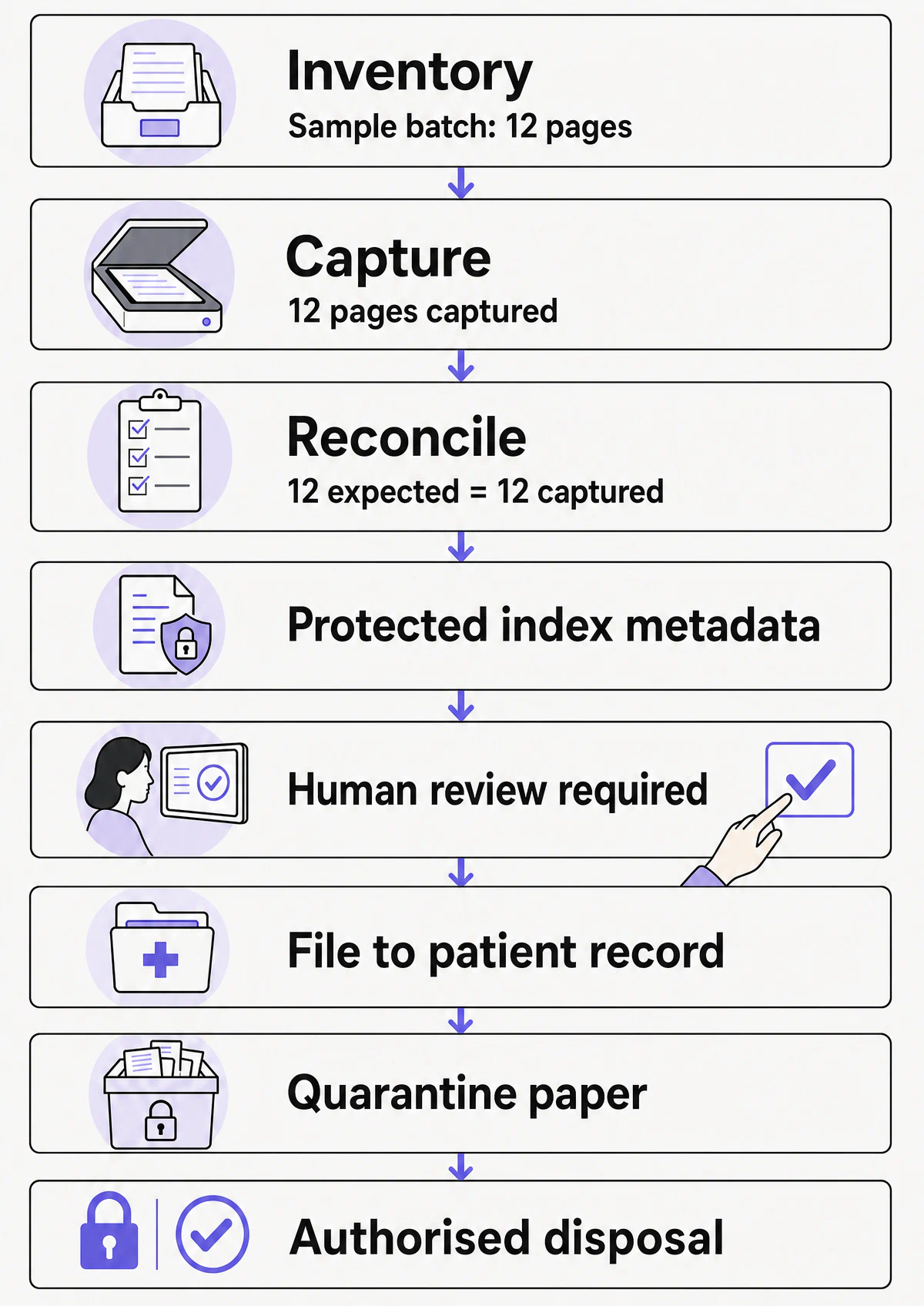
Medical record workflow from capture and human review through filing, quarantine and authorised disposal

1. Assign governance and acceptance criteria

Name a project owner, a clinical safety lead, an information or privacy owner and the designated person authorised to approve disposal. Define which records are in scope, the current disposal authority under the applicable law, records authority or schedule, the target system, required metadata and the evidence needed to accept a batch. A minimum retention period reaching its end is only one input. It does not by itself authorise destruction.

The Australian Digital Health Agency's procurement guidance applies to software that scans, indexes and digitises paper medical records. Its MUST requirements include demonstrating the Essential Eight mitigation strategies, relevant privacy-law adherence, and support for applicable informed-consent, National Safety and Quality Health Service (NSQHS) and Clinical Care standards. Its SHOULD requirements include patient-identification practices, Individual Healthcare Identifiers where relevant, and AS 2828.2 recommendations for digitised health records. This is procurement guidance, not a universal scanning procedure.

2. Build a batch manifest

Give each box, file and scanning batch a unique identifier. The manifest should show custody, status and exceptions without exposing patient names on transport labels or in ordinary email.

At minimum, record:

  • batch ID and source location
  • expected file or folder count
  • patient record number or another approved internal identifier
  • handover date, time and responsible person
  • page or document count when the source allows it
  • exceptions such as missing folders, damaged pages or mixed-patient content
  • import status, quality status and disposal status

Reconcile the manifest at every custody handover. An unexplained difference stops the batch from progressing.

3. Design the index around clinical retrieval

Indexing should follow the way clinicians look for information. Useful fields commonly include patient identifier, document type, service or document date, source organisation, author or responsible clinician, and episode or specialty.

Avoid one whole-chart PDF. Segment the record into clinically meaningful documents or sections and use a controlled list of document types. Store patient details in protected system metadata rather than descriptive filenames that may appear in downloads, logs or backup tools.

For health service organisations, Action 6.05 of the Communicating for Safety Standard requires at least three approved identifiers:

  • on registration and admission
  • when care, medication, therapy and other services are provided
  • when clinical handover, transfer or discharge documentation is generated

Action 6.05 does not prescribe a medical record scanning algorithm. Applying the organisation's approved identity policy to scan matching and import is a risk control derived from that policy. The project should define which identifiers are required, who reviews a proposed match and how unresolved or conflicting identities enter an exception queue.

4. Control physical custody and preparation

Use locked storage and restricted work areas. Record each handover, and keep batches small enough to trace an error back to its source. Active charts need an access plan so clinicians can retrieve the paper or an accepted digital copy throughout the project.

Preparation includes removing staples and clips, unfolding corners, repairing tears without covering content, placing sticky notes so their relationship to the page is clear, and adding separator sheets. Keep the original order. Any mixed-patient page, illegible identifier or missing section belongs in an exception workflow, outside the normal scan stream.

5. Set a fit-for-purpose capture profile

For ordinary paper records, 300 pixels per inch at 100% of original size can be a useful starting point. It is not a general legal threshold for medical records. The National Archives specification sets 300 ppi and a 100% scanning ratio as a Commonwealth-agency minimum for specified business-as-usual digitisation of temporary, non-permanent paper records that will or might be destroyed under General Records Authority 31. The specification is optional but recommended in some other non-permanent cases.

For that scope, accepted formats are TIFF 6.0 with no compression or lossless ZIP or LZW compression, PNG with lossless compression, JPEG at Photoshop compression level 10 to 12 and no less than 77% of the JPEG scale, or PDF/A at maximum image quality. The JPEG requirements also apply to TIFF using lossy JPEG compression. Colour originals use 24-bit sRGB and originals without colour use 8-bit greyscale. Permanent-value records follow the separate preservation standard. A mixed permanent and temporary series whose sources will be destroyed must all be scanned to that preservation standard.

A project profile should also define:

  • duplex capture where information may appear on either side
  • colour capture whenever colour carries meaning, including coloured annotations or graphs
  • a higher-resolution or specialist process for faint, small, damaged or unusual originals
  • automatic deskew and crop settings that never remove handwriting or page edges
  • controlled blank-page detection, with separators and intentionally blank forms handled correctly
  • an archival format and, where needed, a readable clinical access copy

The accepted scanned image is the authoritative reproduction of the paper page. Optical character recognition (OCR) is a derived aid for search and indexing. It can misread handwriting, faint faxes, medication names and numbers, so extracted text should not replace the image. The project's risk assessment should define the human validation needed before OCR-derived data affects a patient match, filing decision or clinical workflow.

6. Scan and keep source order

Operators should work from one traceable batch at a time. Use separator pages or barcodes only after testing them against every common document type. Scanner caches, local downloads and temporary folders need the same access controls and deletion rules as the final record.

Record who scanned the batch, the capture profile, time and any rework. Link rejected images and rescans to the same exception until an accepted version is confirmed, then remove superseded copies under the project procedure.

7. Check image, index and patient match

Quality assurance needs more than opening a few PDFs. It should test four distinct failure modes.

Control Pass condition
Completeness The batch manifest, source files and imported document counts reconcile
Image fidelity Pages are upright, legible, complete, in order and free from hidden edges, corrupt files or unwanted blank pages
Index accuracy Patient, document type, date, source and clinician metadata match the source
Clinical usability An authorised user can find and open the document in the normal clinical workflow

For a high-volume migration, we recommend reconciling every file and batch and requiring human review of each proposed patient-record match before final filing. These are risk controls rather than universal rules stated by APP 11. The documented risk assessment should set the inspection rate, higher scrutiny for exceptions or high-risk formats, and the rework triggered by a failed sample.

Clinical acceptance should cover common retrieval tasks, such as finding an old pathology result, procedure report or specialist letter. This exposes vague labels and oversized files that a technical check can miss.

8. Import, reconcile and release the batch

A small representative pilot should establish the import mapping before the volume increases. Its acceptance evidence should cover date display, multi-page grouping, document category, access permissions, audit events and readability after the organisation's backup and recovery process.

After import, reconcile accepted source items against the eMR. Record unresolved exceptions separately. Release the digital batch for clinical use only when the nominated approver accepts the image, metadata, retrieval and security results.

9. Quarantine and dispose of source records correctly

Scanning and APP 11 do not themselves authorise destruction of a source medical record or set a healthcare retention period. Keep paper in secure quarantine after digital acceptance. Destruction requires current authority under the applicable law, records authority or approved schedule, every legal, regulatory, investigation and litigation hold resolved, and approval from the designated records owner. The end of a minimum retention period is insufficient on its own.

APP 11.1 requires an APP entity that holds personal information to take reasonable steps to protect it from misuse, interference and loss, and from unauthorised access, modification or disclosure. APP 11.2 applies when the entity no longer needs the information for any purpose for which the APPs permit use or disclosure. It then requires reasonable steps to destroy the information or ensure it is de-identified, except when the information is in a Commonwealth record or retention is required by or under an Australian law or a court or tribunal order. The APP 11 guidance also says these reasonable steps include technical and organisational measures.

For hard copy, ordinary garbage or recycling does not ordinarily meet the destruction test unless the information has first been destroyed, for example by shredding, pulping or disintegration. Outsourced hard-copy destruction should be confirmed and evidenced under the project's risk-assessed process, such as with a certificate when the provider issues one. Separately, the OAIC's verification example applies where personal information is held on a third party's hardware and the organisation instructs that provider to irretrievably destroy it. In that case, reasonable steps include verifying that the destruction occurred.

APP 11.2 extends to all copies an organisation holds, including archives and backups. Putting electronic information beyond use is a limited treatment when irretrievable destruction is technically impossible, such as a backup that cannot be selectively erased without destroying information that must be retained. The entity must be unable and undertake not to use or disclose it, prevent access by any other entity, protect it with access controls, logs and audit trails, and commit to irretrievable destruction when that becomes possible. The OAIC expects this situation to be rare.

Record the authority, owner approval, resolved holds, scope, date, method, provider and evidence for each disposal. Include temporary images, transfer media, scanner caches and provider-held copies when their approved purpose ends.

Security and privacy controls for the project

A scanning project concentrates sensitive information in staging areas. Its risk assessment should cover paper, scanners, workstations, transfers, the eMR and backups.

The risk assessment should select controls for the volume, sensitivity, custody path and consequences of a breach. Common controls include:

  • named access roles, least-privilege access and prompt removal of access when work ends
  • multi-factor authentication for systems that hold or transfer scans
  • encrypted transfer and storage, with no unmanaged person-to-person email or portable drives
  • audit logs for access, export, matching, import, correction and deletion
  • locked transport, tamper-evident containers and documented chain of custody
  • approved processing and storage locations, including overseas access, subcontractors and backups
  • an exercised incident and data-breach response path
  • contractual return, deletion and deletion-verification requirements
  • staff training on mixed-patient pages, misfiles, suspicious requests and exceptions

A designated vendor ingestion address is different from staff sending records to one another through unmanaged person-to-person email. Document Sorter supports forwarding to that designated address, a desktop folder and direct upload. The practice must assess access, encryption, routing, retention, logging, incident response and deletion for each channel.

The OAIC's APP 11 guidance treats governance, training, ICT security, access security, third-party providers, physical security and destruction as parts of the same layered approach. A vendor's security platform cannot compensate for an uncontrolled pickup, shared login or forgotten temporary folder.

Medical record scanning acceptance checklist

For a high-volume project, we recommend adapting this baseline to the documented risks and applicable requirements:

  • The batch has a unique ID and complete custody history.
  • Source files, expected counts and imported counts reconcile.
  • The approved identity policy has been applied, with human review of proposed matches at the risk-assessed point.
  • Exceptions are recorded, owned and resolved or explicitly held open.
  • Images are complete, legible, upright and in the correct order.
  • Colour and fine detail are preserved where clinically meaningful, and document types and dates support retrieval.
  • OCR text has not replaced the source image or bypassed clinical review.
  • Access permissions and audit logging work in the destination system.
  • Temporary copies and superseded scans have been removed, and clinical users have accepted representative retrieval tasks.
  • Paper remains quarantined until retention and disposal approval is complete.
  • Current destruction authority is recorded, all holds are resolved and the designated owner has approved disposal.
  • The disposal record covers paper, provider copies, media, caches and backups as applicable, with a provider certificate retained where one was issued.

Frequently asked questions

Can paper medical records be destroyed after scanning?

Only when destruction is currently authorised under the applicable law, records authority or approved schedule. Digital acceptance and an expired minimum retention period are insufficient. Every hold must be resolved, and the designated records owner must approve and document the batch. APP 11 neither sets a healthcare retention period nor authorises destruction of the paper source.

Is 300 dpi enough for medical records?

It can be a sound baseline for ordinary text pages. The National Archives figure is a Commonwealth-agency minimum for specified temporary, non-permanent records at a 100% scanning ratio, not a universal medical-record rule. Faint or fine-detail originals may need higher resolution, colour or specialist capture. Permanent-value and mixed series within its scope use separate preservation rules.

Does OCR turn a scanned chart into structured clinical data?

No. The accepted image is the authoritative reproduction. OCR is a derived search and indexing aid, not validated diagnoses, medicines, allergies or observations. Apply the project's risk-assessed human validation before extracted information affects matching, filing or care.

How should a practice handle new scanned documents after the archive is complete?

Create a daily intake workflow with the same matching, review, filing and audit controls. For Bp Premier practices, Lyrebird Document Sorter supports forwarding to a designated ingestion address, a desktop folder and direct upload. It can propose patient and document details and hold the result for staff review before filing.

Good scanning preserves clinical history. Good indexing, review and governance make that history usable and safe.

If your Bp Premier practice wants to reduce the manual work between scanning and filing, Contact us to discuss Document Sorter.

More Resources
Continue reading
Posts
The dangers of Copy Paste Scribes
Read More
Posts
How to use an AI medical scribe
Read More
Posts
December Product Updates
Read More
Education
Medicare Bulk Billing Consent Forms: A 2026 Guide for Practices
Read More
Education
Clinical Documentation Audit: A Practical Australian Guide
Read More
Education
Patient Education Materials: An Australian Clinician's Guide
Read More
Post
5 min read

Scanning Medical Records: A Practical Australian Guide

Published on
September 1, 2026
White text reading Scanning medical records on a violet Lyrebird Health background.
Contributors
Lyrebird Health
Subscribe to our newsletter
Read about our privacy policy.
Thank you! Your submission has been received!
Oops! Something went wrong while submitting the form.

Scanning a storeroom of paper charts can improve access to clinical history and release valuable space. It can also create a new set of risks if pages are missed, records are filed against the wrong patient, or staff must scroll through one enormous PDF during a consult. A sound medical record scanning project preserves the source faithfully, makes it clinically usable and controls every copy from collection to disposal.

What scanning medical records should achieve

Medical record scanning converts paper documents into digital images, then indexes and links them to the correct electronic medical record (eMR). The image is only one part of the result. A clinician also needs to find the right report, date and episode of care without reading the patient's entire historical file.

That distinction matters. A 2002 hospital scanning study surveyed 70 physicians at one 410-bed Norwegian hospital and interviewed eight. Physicians reported routine electronic retrieval for nine of 11 tasks, and a majority found retrieval tasks easier. However, 22% to 25% reported more difficulty retrieving patient data. Scanned images were rated below native electronic data, and internists described long, multi-document scans as time-consuming. This single-hospital study measured reported work practices and attitudes, not patient outcomes or universal effects.

A successful project therefore has four outcomes:

  • every required page is captured clearly and in the correct order
  • every document is linked to the right patient and labelled consistently
  • authorised staff can retrieve it quickly in the clinical system
  • paper and temporary digital copies remain controlled until their approved disposal

Set the scope before the first page is scanned

Start with an inventory rather than a scanner. Count files, boxes and unusual formats, then separate the work into meaningful groups.

Record group Practical treatment
Active patient files Prioritise for retrieval, use smaller document groups and keep them available during migration
Inactive files still within retention Scan by planned batch or retain securely in paper, based on access needs and project value
Records past a minimum retention period Retain them unless destruction is currently authorised under the applicable law, records authority or schedule, every hold is resolved and the designated owner approves
New paper received each day Create an ongoing capture and filing workflow so a new backlog does not form
Fragile, faint or unusual material Route to a specialist workflow for items such as thermal printouts, ECG traces, photographs and oversized sheets

The inventory should expose the real workload. Preparation, exception handling, indexing, import and quality assurance often take more effort than image capture. Record a unique batch ID, source location, file range, expected patient files and responsible custodian before anything moves.

Choose in-house scanning or an external service

Both models can work. The decision depends on volume, record condition, access needs, staff capacity and the clinical system that will receive the files.

Consideration In-house workflow may suit External service may suit
Volume A steady, manageable daily intake A large archive with a defined deadline
Paper formats Mostly consistent A4 or A5 sheets Mixed sizes, bound files, fragile paper or imaging media
Patient access needs Active files must stay on site Files can be released in controlled batches, or the provider offers secure on-site scanning
Skills and equipment Trained staff and production equipment are available Specialist preparation, high-volume capture and data conversion are needed
Import Staff can index directly into the clinical system A tested bulk-import package and reconciliation report are required

Outsourcing changes who performs the work. It does not necessarily remove a practice's APP 11 duties. A practice still holds personal information when it has possession or control of the record, including third-party storage it retains the right or power to deal with. The APP 11 guidance applies that test rather than treating outsourcing as an automatic transfer of responsibility.

Overseas processing needs a separate analysis. If providing records to an overseas contractor is a disclosure, APP 8.1 generally requires reasonable steps beforehand to ensure the recipient does not breach the APPs, other than APP 1. Section 16C can attribute the recipient's act or practice to the Australian APP entity. Exceptions apply, and an overseas contractor arrangement can instead be a use in limited cases where the practice keeps effective control. The cross-border guidance explains both distinctions.

For practices using Bp Premier, our Document Sorter can take over part of the workflow after paper has been scanned. It supports forwarding documents to a designated ingestion address, a desktop folder and direct upload, including batches. It extracts patient, date-of-birth and clinician details, proposes a match and filing metadata, then lets a staff member review the result before sending it to the Doctor's Inbox or patient record. Every send is logged. It does not perform the physical scanning.

A safe medical record scanning workflow

Treat each batch as a controlled transfer between two record systems. The paper remains the source until the digital version has passed the agreed acceptance checks. Unless a cited law or standard sets an exact obligation, the controls below are recommended starting points to adapt through the project's risk assessment.

Medical record workflow from capture and human review through filing, quarantine and authorised disposal

1. Assign governance and acceptance criteria

Name a project owner, a clinical safety lead, an information or privacy owner and the designated person authorised to approve disposal. Define which records are in scope, the current disposal authority under the applicable law, records authority or schedule, the target system, required metadata and the evidence needed to accept a batch. A minimum retention period reaching its end is only one input. It does not by itself authorise destruction.

The Australian Digital Health Agency's procurement guidance applies to software that scans, indexes and digitises paper medical records. Its MUST requirements include demonstrating the Essential Eight mitigation strategies, relevant privacy-law adherence, and support for applicable informed-consent, National Safety and Quality Health Service (NSQHS) and Clinical Care standards. Its SHOULD requirements include patient-identification practices, Individual Healthcare Identifiers where relevant, and AS 2828.2 recommendations for digitised health records. This is procurement guidance, not a universal scanning procedure.

2. Build a batch manifest

Give each box, file and scanning batch a unique identifier. The manifest should show custody, status and exceptions without exposing patient names on transport labels or in ordinary email.

At minimum, record:

  • batch ID and source location
  • expected file or folder count
  • patient record number or another approved internal identifier
  • handover date, time and responsible person
  • page or document count when the source allows it
  • exceptions such as missing folders, damaged pages or mixed-patient content
  • import status, quality status and disposal status

Reconcile the manifest at every custody handover. An unexplained difference stops the batch from progressing.

3. Design the index around clinical retrieval

Indexing should follow the way clinicians look for information. Useful fields commonly include patient identifier, document type, service or document date, source organisation, author or responsible clinician, and episode or specialty.

Avoid one whole-chart PDF. Segment the record into clinically meaningful documents or sections and use a controlled list of document types. Store patient details in protected system metadata rather than descriptive filenames that may appear in downloads, logs or backup tools.

For health service organisations, Action 6.05 of the Communicating for Safety Standard requires at least three approved identifiers:

  • on registration and admission
  • when care, medication, therapy and other services are provided
  • when clinical handover, transfer or discharge documentation is generated

Action 6.05 does not prescribe a medical record scanning algorithm. Applying the organisation's approved identity policy to scan matching and import is a risk control derived from that policy. The project should define which identifiers are required, who reviews a proposed match and how unresolved or conflicting identities enter an exception queue.

4. Control physical custody and preparation

Use locked storage and restricted work areas. Record each handover, and keep batches small enough to trace an error back to its source. Active charts need an access plan so clinicians can retrieve the paper or an accepted digital copy throughout the project.

Preparation includes removing staples and clips, unfolding corners, repairing tears without covering content, placing sticky notes so their relationship to the page is clear, and adding separator sheets. Keep the original order. Any mixed-patient page, illegible identifier or missing section belongs in an exception workflow, outside the normal scan stream.

5. Set a fit-for-purpose capture profile

For ordinary paper records, 300 pixels per inch at 100% of original size can be a useful starting point. It is not a general legal threshold for medical records. The National Archives specification sets 300 ppi and a 100% scanning ratio as a Commonwealth-agency minimum for specified business-as-usual digitisation of temporary, non-permanent paper records that will or might be destroyed under General Records Authority 31. The specification is optional but recommended in some other non-permanent cases.

For that scope, accepted formats are TIFF 6.0 with no compression or lossless ZIP or LZW compression, PNG with lossless compression, JPEG at Photoshop compression level 10 to 12 and no less than 77% of the JPEG scale, or PDF/A at maximum image quality. The JPEG requirements also apply to TIFF using lossy JPEG compression. Colour originals use 24-bit sRGB and originals without colour use 8-bit greyscale. Permanent-value records follow the separate preservation standard. A mixed permanent and temporary series whose sources will be destroyed must all be scanned to that preservation standard.

A project profile should also define:

  • duplex capture where information may appear on either side
  • colour capture whenever colour carries meaning, including coloured annotations or graphs
  • a higher-resolution or specialist process for faint, small, damaged or unusual originals
  • automatic deskew and crop settings that never remove handwriting or page edges
  • controlled blank-page detection, with separators and intentionally blank forms handled correctly
  • an archival format and, where needed, a readable clinical access copy

The accepted scanned image is the authoritative reproduction of the paper page. Optical character recognition (OCR) is a derived aid for search and indexing. It can misread handwriting, faint faxes, medication names and numbers, so extracted text should not replace the image. The project's risk assessment should define the human validation needed before OCR-derived data affects a patient match, filing decision or clinical workflow.

6. Scan and keep source order

Operators should work from one traceable batch at a time. Use separator pages or barcodes only after testing them against every common document type. Scanner caches, local downloads and temporary folders need the same access controls and deletion rules as the final record.

Record who scanned the batch, the capture profile, time and any rework. Link rejected images and rescans to the same exception until an accepted version is confirmed, then remove superseded copies under the project procedure.

7. Check image, index and patient match

Quality assurance needs more than opening a few PDFs. It should test four distinct failure modes.

Control Pass condition
Completeness The batch manifest, source files and imported document counts reconcile
Image fidelity Pages are upright, legible, complete, in order and free from hidden edges, corrupt files or unwanted blank pages
Index accuracy Patient, document type, date, source and clinician metadata match the source
Clinical usability An authorised user can find and open the document in the normal clinical workflow

For a high-volume migration, we recommend reconciling every file and batch and requiring human review of each proposed patient-record match before final filing. These are risk controls rather than universal rules stated by APP 11. The documented risk assessment should set the inspection rate, higher scrutiny for exceptions or high-risk formats, and the rework triggered by a failed sample.

Clinical acceptance should cover common retrieval tasks, such as finding an old pathology result, procedure report or specialist letter. This exposes vague labels and oversized files that a technical check can miss.

8. Import, reconcile and release the batch

A small representative pilot should establish the import mapping before the volume increases. Its acceptance evidence should cover date display, multi-page grouping, document category, access permissions, audit events and readability after the organisation's backup and recovery process.

After import, reconcile accepted source items against the eMR. Record unresolved exceptions separately. Release the digital batch for clinical use only when the nominated approver accepts the image, metadata, retrieval and security results.

9. Quarantine and dispose of source records correctly

Scanning and APP 11 do not themselves authorise destruction of a source medical record or set a healthcare retention period. Keep paper in secure quarantine after digital acceptance. Destruction requires current authority under the applicable law, records authority or approved schedule, every legal, regulatory, investigation and litigation hold resolved, and approval from the designated records owner. The end of a minimum retention period is insufficient on its own.

APP 11.1 requires an APP entity that holds personal information to take reasonable steps to protect it from misuse, interference and loss, and from unauthorised access, modification or disclosure. APP 11.2 applies when the entity no longer needs the information for any purpose for which the APPs permit use or disclosure. It then requires reasonable steps to destroy the information or ensure it is de-identified, except when the information is in a Commonwealth record or retention is required by or under an Australian law or a court or tribunal order. The APP 11 guidance also says these reasonable steps include technical and organisational measures.

For hard copy, ordinary garbage or recycling does not ordinarily meet the destruction test unless the information has first been destroyed, for example by shredding, pulping or disintegration. Outsourced hard-copy destruction should be confirmed and evidenced under the project's risk-assessed process, such as with a certificate when the provider issues one. Separately, the OAIC's verification example applies where personal information is held on a third party's hardware and the organisation instructs that provider to irretrievably destroy it. In that case, reasonable steps include verifying that the destruction occurred.

APP 11.2 extends to all copies an organisation holds, including archives and backups. Putting electronic information beyond use is a limited treatment when irretrievable destruction is technically impossible, such as a backup that cannot be selectively erased without destroying information that must be retained. The entity must be unable and undertake not to use or disclose it, prevent access by any other entity, protect it with access controls, logs and audit trails, and commit to irretrievable destruction when that becomes possible. The OAIC expects this situation to be rare.

Record the authority, owner approval, resolved holds, scope, date, method, provider and evidence for each disposal. Include temporary images, transfer media, scanner caches and provider-held copies when their approved purpose ends.

Security and privacy controls for the project

A scanning project concentrates sensitive information in staging areas. Its risk assessment should cover paper, scanners, workstations, transfers, the eMR and backups.

The risk assessment should select controls for the volume, sensitivity, custody path and consequences of a breach. Common controls include:

  • named access roles, least-privilege access and prompt removal of access when work ends
  • multi-factor authentication for systems that hold or transfer scans
  • encrypted transfer and storage, with no unmanaged person-to-person email or portable drives
  • audit logs for access, export, matching, import, correction and deletion
  • locked transport, tamper-evident containers and documented chain of custody
  • approved processing and storage locations, including overseas access, subcontractors and backups
  • an exercised incident and data-breach response path
  • contractual return, deletion and deletion-verification requirements
  • staff training on mixed-patient pages, misfiles, suspicious requests and exceptions

A designated vendor ingestion address is different from staff sending records to one another through unmanaged person-to-person email. Document Sorter supports forwarding to that designated address, a desktop folder and direct upload. The practice must assess access, encryption, routing, retention, logging, incident response and deletion for each channel.

The OAIC's APP 11 guidance treats governance, training, ICT security, access security, third-party providers, physical security and destruction as parts of the same layered approach. A vendor's security platform cannot compensate for an uncontrolled pickup, shared login or forgotten temporary folder.

Medical record scanning acceptance checklist

For a high-volume project, we recommend adapting this baseline to the documented risks and applicable requirements:

  • The batch has a unique ID and complete custody history.
  • Source files, expected counts and imported counts reconcile.
  • The approved identity policy has been applied, with human review of proposed matches at the risk-assessed point.
  • Exceptions are recorded, owned and resolved or explicitly held open.
  • Images are complete, legible, upright and in the correct order.
  • Colour and fine detail are preserved where clinically meaningful, and document types and dates support retrieval.
  • OCR text has not replaced the source image or bypassed clinical review.
  • Access permissions and audit logging work in the destination system.
  • Temporary copies and superseded scans have been removed, and clinical users have accepted representative retrieval tasks.
  • Paper remains quarantined until retention and disposal approval is complete.
  • Current destruction authority is recorded, all holds are resolved and the designated owner has approved disposal.
  • The disposal record covers paper, provider copies, media, caches and backups as applicable, with a provider certificate retained where one was issued.

Frequently asked questions

Can paper medical records be destroyed after scanning?

Only when destruction is currently authorised under the applicable law, records authority or approved schedule. Digital acceptance and an expired minimum retention period are insufficient. Every hold must be resolved, and the designated records owner must approve and document the batch. APP 11 neither sets a healthcare retention period nor authorises destruction of the paper source.

Is 300 dpi enough for medical records?

It can be a sound baseline for ordinary text pages. The National Archives figure is a Commonwealth-agency minimum for specified temporary, non-permanent records at a 100% scanning ratio, not a universal medical-record rule. Faint or fine-detail originals may need higher resolution, colour or specialist capture. Permanent-value and mixed series within its scope use separate preservation rules.

Does OCR turn a scanned chart into structured clinical data?

No. The accepted image is the authoritative reproduction. OCR is a derived search and indexing aid, not validated diagnoses, medicines, allergies or observations. Apply the project's risk-assessed human validation before extracted information affects matching, filing or care.

How should a practice handle new scanned documents after the archive is complete?

Create a daily intake workflow with the same matching, review, filing and audit controls. For Bp Premier practices, Lyrebird Document Sorter supports forwarding to a designated ingestion address, a desktop folder and direct upload. It can propose patient and document details and hold the result for staff review before filing.

Good scanning preserves clinical history. Good indexing, review and governance make that history usable and safe.

If your Bp Premier practice wants to reduce the manual work between scanning and filing, Contact us to discuss Document Sorter.

Keep reading

All posts
Questions about compliance?