New Patient Form Template for Australian Medical Practices

A clear new patient form helps an Australian medical practice create the right record, identify the patient safely and surface information that matters before the first consult. This page gives practice managers and clinicians an editable registration template, plus the implementation, privacy and accessibility checks needed before it goes into use.
Copy the template into Word, Google Docs or your form builder, then replace every item in square brackets. It is a starting point, not legal advice or a substitute for clinical governance. Your final form should reflect your setting, patient population, privacy policy, practice software and applicable Commonwealth, state or territory requirements.
For patients: Do not use a registration form to request urgent medical help. In an emergency, call Triple Zero (000). Add your practice's own urgent and after-hours instructions before using this template.
Copy and edit the new patient form template
This version keeps registration, limited clinical safety information and the privacy collection notice together. It deliberately leaves detailed history-taking and workflow-wide intake questions to a separate patient intake form and workflow guide.
Before sending the form to patients:
- Replace all square-bracketed prompts.
- Mark only genuinely necessary fields as required.
- Remove fields your practice cannot justify collecting.
- Have the privacy notice and any consent wording reviewed for your practice.
- Convert the template into properly labelled, accessible fields if you publish it online.
[PRACTICE NAME]
NEW PATIENT REGISTRATION FORM

Please complete this form so we can create your patient record and prepare for
your first appointment. Ask our team if you need an interpreter, communication
assistance, an accessible format or help completing the form.

Do not use this form for urgent medical concerns. In an emergency, call 000.
For urgent or after-hours care, [insert practice instructions and phone number].

Fields marked * are required to register you at this practice.

1. PATIENT DETAILS

Full name used for your health record*: ___________________________

Legal or Medicare name, if different and required for the service:
__________________________________________________________________

Preferred name: __________________________________________________

Previous or other names relevant to your health record: ___________

Date of birth*: ____ / ____ / ________

Residential address or "no fixed address"*: ______________________

Suburb: ___________________ State: _______ Postcode: _______________

Postal address, if different: _____________________________________

Sex recorded at birth, if relevant to your care or administration:
__________________________________________________________________

Gender identity, optional: ________________________________________

Pronouns, optional: _______________________________________________

Aboriginal and/or Torres Strait Islander status, if collected for care,
service access or reporting:
[ ] Aboriginal
[ ] Torres Strait Islander
[ ] Aboriginal and Torres Strait Islander
[ ] Neither  [ ] Prefer not to say

2. CONTACT AND COMMUNICATION

Primary contact phone*: ___________________________________________

Phone type: [ ] Mobile  [ ] Home  [ ] Work  [ ] Other

Other phone: ______________________________________________________

Email: ____________________________________________________________

Preferred contact method:
[ ] Phone  [ ] SMS  [ ] Email  [ ] Post  [ ] Other: ______________

May we leave a voicemail asking you to contact the practice?
[ ] Yes  [ ] No

May we send appointment reminders by SMS?
[ ] Yes  [ ] No

Preferred spoken language: ________________________________________

Do you need an interpreter?
[ ] No  [ ] Yes, language/Auslan: _________________________________

Communication or accessibility needs we should plan for:
__________________________________________________________________

3. EMERGENCY CONTACT

Name: _____________________________________________________________

Relationship to patient: __________________________________________

Phone: ____________________________________________________________

May we contact this person in an emergency?
[ ] Yes  [ ] No

This nomination does not by itself authorise the person to access your health
information or make healthcare decisions for you.

4. MEDICARE, DVA AND BILLING DETAILS

Complete only the fields that apply to the services you receive.

Medicare number: _________________________________________________

Individual reference number: __________ Expiry: ____ / __________

Department of Veterans' Affairs number: ___________________________

DVA card type and expiry: _________________________________________

Pensioner or Health Care Card number and expiry: __________________

Private health insurer and member number, if relevant: ____________

Usual GP or medical practice: _____________________________________

Preferred pharmacy and suburb: ___________________________________

Referral source or referring practitioner, if relevant: ___________

5. INFORMATION FOR SAFE FIRST CONTACT

This section is a brief safety screen. Your clinician may ask for a fuller
history during your appointment.

Allergies or adverse reactions:
[ ] None known
[ ] Yes. Substance, reaction and severity: _________________________
__________________________________________________________________

Current medicines, including non-prescription medicines and supplements:
[ ] None
[ ] List medicine, strength and dose: ______________________________
__________________________________________________________________

Current medical conditions or important health alerts the practice should know
before your first appointment: ____________________________________
__________________________________________________________________

Reason for your first appointment, optional: _______________________
__________________________________________________________________

Is there anything we should arrange to support safe access or communication
at the appointment? _______________________________________________

6. PARENT, GUARDIAN OR AUTHORISED REPRESENTATIVE

Complete this section if someone is filling in the form for the patient.

Name: _____________________________________________________________

Relationship to patient: __________________________________________

Phone and email: __________________________________________________

Authority to act for the patient: __________________________________

Evidence of authority sighted or recorded, where required:
[ ] Yes  [ ] No  [ ] Not applicable

7. PRIVACY COLLECTION NOTICE

[Practice legal name] collects personal and health information to identify you,
create and maintain your patient record, provide and manage health services,
communicate with you, process billing or benefit claims, and meet our legal and
professional obligations.

If you do not provide information marked as required, we may be unable to
[register you / identify you safely / provide a service / process a claim].

We may collect information directly from you and, where relevant, from
[list likely sources, such as a parent or guardian, referring practitioner,
other treating provider, pathology or imaging service]. We may disclose
information, where permitted, authorised or required, to [list the usual
recipient categories that genuinely apply, such as members of the treating
team, referred providers, diagnostic services, Medicare, DVA, insurers,
My Health Record and contracted service providers].

Our privacy policy at [privacy policy URL or location] explains how you can
request access to or correction of your information and how to make a privacy
complaint. Contact [privacy contact role, phone and email] with questions.

[Choose and complete one: We are not likely to disclose your personal
information to overseas recipients / We may disclose your personal information
to recipients in the following countries: ____________.]

8. ACKNOWLEDGEMENT AND COLLECTION CONSENT

[ ] I have read or had explained to me the privacy collection notice above.

[ ] I consent to the practice collecting the personal and health information I
provide in this form for the purposes described above, subject to applicable law
and the practice's privacy policy.

I confirm that the information I have provided is accurate and complete to the
best of my knowledge. I will tell the practice if important details change.

Patient or representative name: ___________________________________

Signature: ______________________________ Date: ____ / ____ / ______

If signed by a representative, relationship and authority: _________
__________________________________________________________________

9. STAFF USE ONLY

[ ] Searched for an existing or duplicate patient record
[ ] Confirmed at least three approved patient identifiers
[ ] Medicare, DVA or concession details verified where required
[ ] Communication preferences recorded
[ ] Interpreter or accessibility requirements flagged
[ ] Privacy collection notice provided
[ ] Collection consent or other applicable authority recorded
[ ] Allergy, medicine and other immediate safety information reviewed
[ ] Information entered into the correct patient record
[ ] Paper or temporary copies stored or disposed of under practice policy

Staff member: ____________________________ Date: ____ / ____ / ______

Form version: ____________________________ Review date: ______________
Essential fields and what to keep optional
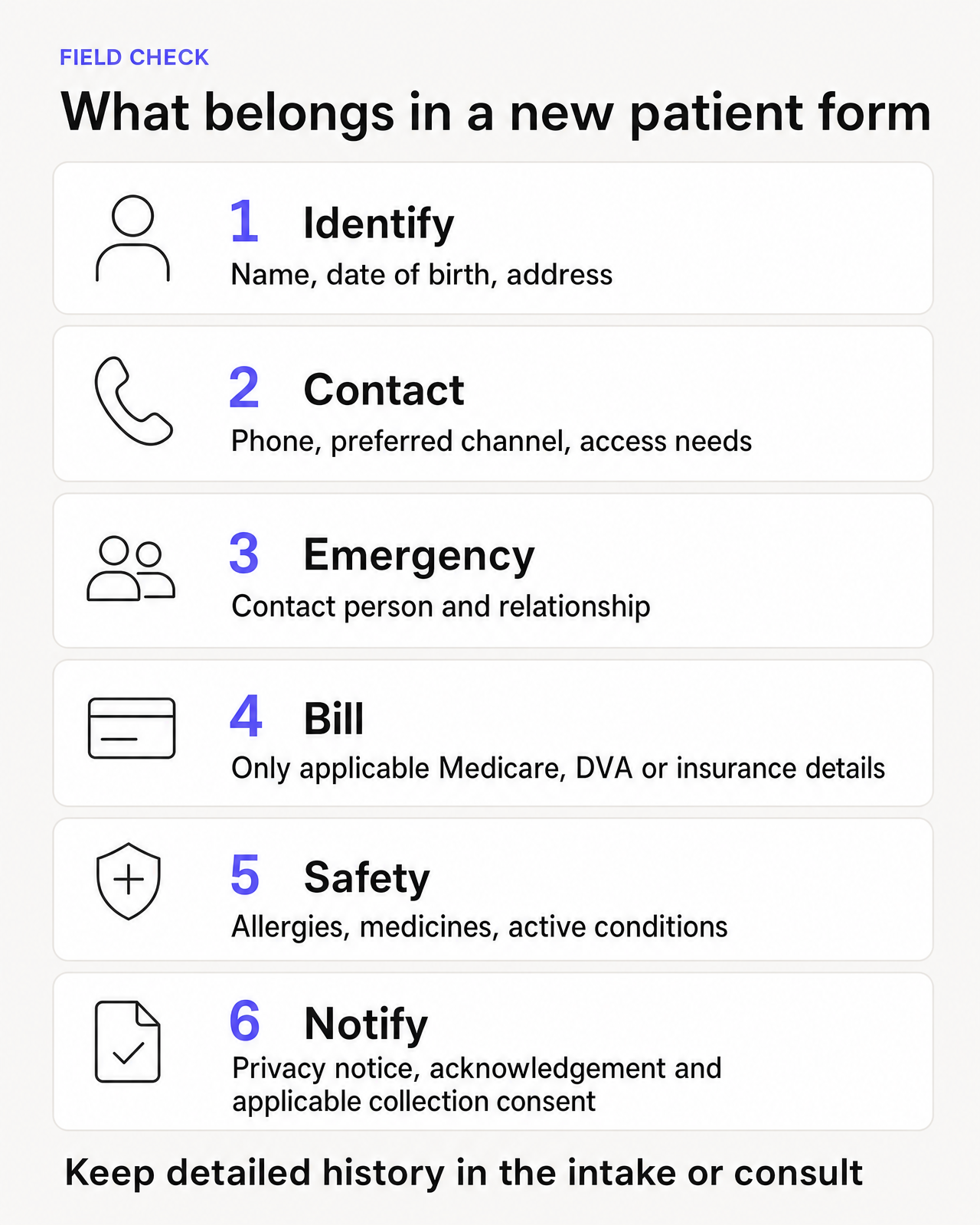
No single form suits every general practice, specialist clinic or allied health service. Treat the template as a field library, then decide what your practice genuinely needs.
| Field group | Usually include | Implementation note |
|---|---|---|
| Patient identification | Full name, date of birth and residential address | Use enough reliable identifiers to create the correct record and reduce duplicate records. For general practices, the RACGP patient identification standard requires a minimum of three approved patient identifiers. |
| Contact details | A reliable phone number and, where used, an email or postal address | Ask how the patient prefers to be contacted. Keep permission for voicemail, SMS and other channels explicit. |
| Communication and access | Preferred language, interpreter need, communication support and physical or digital access needs | Offer a way to request help without requiring the patient to disclose more than the practice needs to arrange support. |
| Emergency contact | Name, relationship and phone number | Explain that an emergency contact is not automatically an authorised representative, substitute decision-maker or person entitled to health information. |
| Billing and eligibility | Medicare, DVA, concession or insurer details that apply to the service | Make conditional fields optional. Do not collect every identifier from every patient merely because the software has a field for it. |
| Immediate clinical safety | Allergies and reactions, current medicines and important active conditions | Keep this short and make sure a staff member or clinician reviews it. A registration form is not a clinical triage service. |
| Representative details | Name, relationship, contact details and basis of authority | Use for a parent, guardian or other authorised representative. Record or verify authority when the workflow requires it. |
| Privacy and declaration | A tailored collection notice, acknowledgement, applicable collection consent, signature and date | Keep consent to marketing, research, AI capture, specific procedures or other separate purposes out of a bundled registration declaration. |
Fields such as sex recorded at birth, gender identity, Aboriginal and Torres Strait Islander status, occupation, relationship status, cultural background, lifestyle factors and detailed family history can support care in the right setting. They should not automatically become mandatory registration fields. Define the purpose, explain it to patients and give an appropriate response option before collecting them.
Implementation notes for paper and online forms
Separate registration from broader intake and consent
A registration form creates or updates the patient record. A broader intake process may also collect a reason for attendance, referral material, questionnaires and preparation instructions. Design that wider patient intake form and workflow separately instead of adding every possible question to this template.
Registration is also not blanket consent for treatment, recording, artificial intelligence use, research, marketing or every future disclosure. If your practice seeks consent before the appointment for a specific workflow, keep that explanation and choice distinct. See our guide to getting patient consent pre-appointment.
Configure the workflow, not just the form
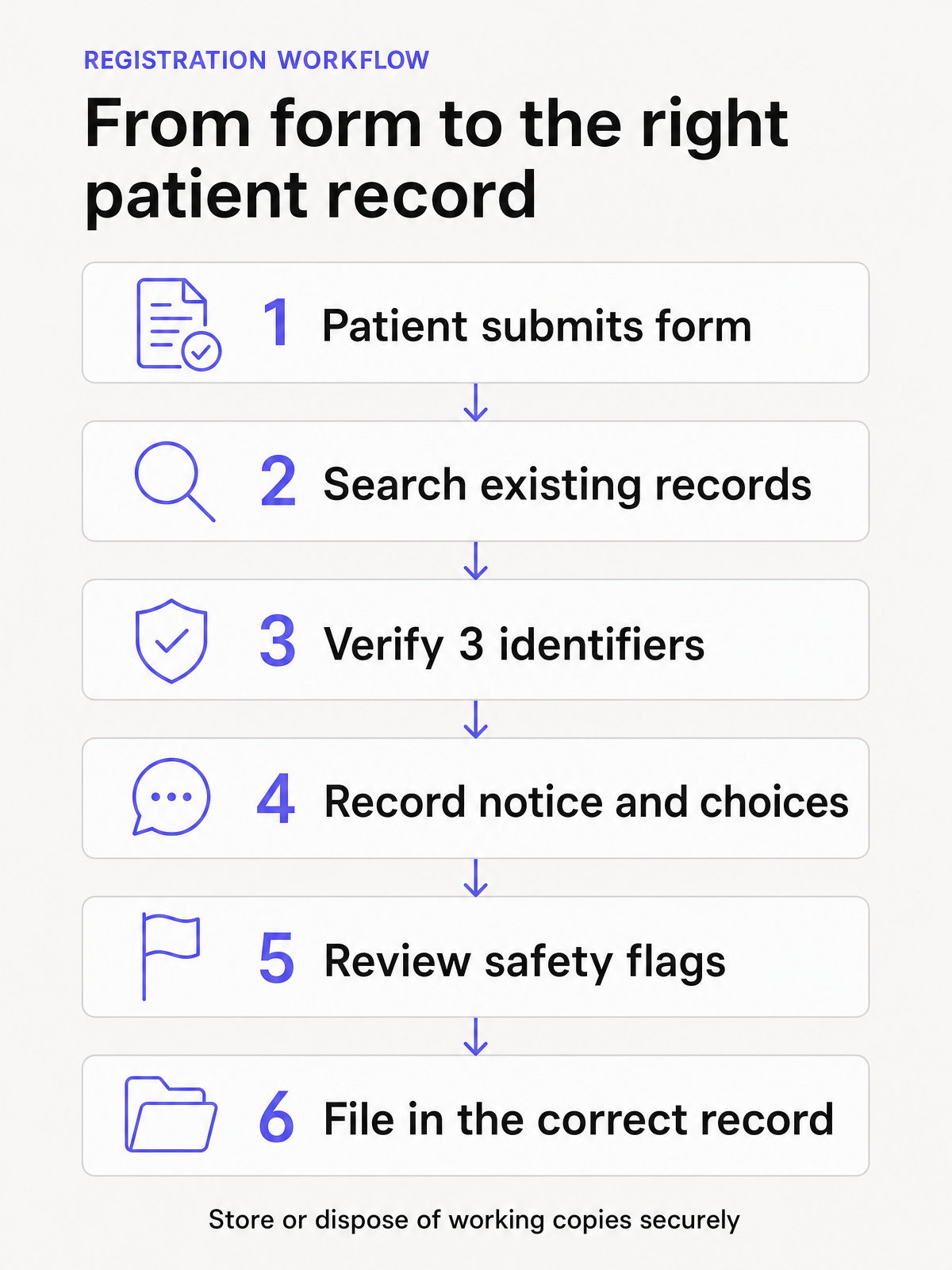
- Assign an owner. Decide who checks for an existing record, verifies identity, reviews clinical safety answers and follows up incomplete fields.
- Map every field. Send each answer to the correct structured field in the practice system where possible. Avoid a single PDF attachment that staff must repeatedly open and re-key.
- Use conditional questions. Show DVA, concession, private insurance and representative fields only when they apply.
- Prevent duplicates. Search the practice system before creating a new record. The RACGP patient identification standard lists name, date of birth, address, Medicare or DVA number, and an individual phone number as approved identifiers, and requires general practices to use at least three. It also says a Medicare card cannot be the sole identifier and that visual inspection of identification is sufficient, without storing a copy in the patient record.
- Create a clinical review step. Route allergies, adverse reactions, medicine discrepancies and stated safety concerns to an appropriately trained person before the consult.
- Give patients another channel. Offer a paper, phone-assisted or in-person option for people who cannot or do not want to use the online form.
- Plan corrections. Tell patients how to correct a mistake after submission and make sure staff can update the record without erasing audit history.
- Control versions. Put a version number, owner and review date on the form. Retire older links and paper stock when the wording changes.
- Avoid email attachments where possible. Use an appropriately secured collection method, restrict staff access and document what happens to working copies after data entry.
If you offer a download, provide an editable document and a tagged, fillable PDF rather than a scanned image. Keep the on-page version available so patients are not forced to download software just to read the questions.
Privacy wording and collection notice prompts
Health information is sensitive information. The Office of the Australian Information Commissioner (OAIC) explains that an organisation may only collect personal information that is reasonably necessary for its functions or activities. Sensitive information generally has an additional consent requirement unless an exception applies. The OAIC also recommends a data-minimisation approach: collect relevant information, keep it to the minimum needed and avoid collecting information merely because it may be useful later. See the OAIC's APP 3 guidance.
Under Australian Privacy Principle (APP) 5, an APP entity must take reasonable steps to notify a person of relevant collection matters or ensure they are aware of them at or before collection, or as soon as practicable afterwards. The matters can include:
- the practice's identity and contact details
- the circumstances and purpose of collection
- whether collection is required or authorised by law
- the main consequences of not providing the information
- usual disclosures
- how to access the privacy policy, request access or correction, and complain
- whether overseas disclosure is likely and, where practicable, the countries involved
The OAIC notes that a short notice on a form can link to a longer privacy notice, provided the form clearly and prominently gives the relevant information. Review the full APP 5 notification guidance before finalising your wording.
Do not copy the prompt in the template without completing it. Confirm the legal entity operating the practice, the actual purposes, likely sources, usual recipient categories, privacy contact, policy location and overseas disclosure position. Remove recipients that do not apply. Add any notice required by the law governing your specific service.
The collection notice should also match what happens after submission. APP 11 requires reasonable steps to protect personal information from misuse, interference, loss and unauthorised access, modification or disclosure. Security measures should cover the full information lifecycle, including temporary files, paper copies, integrations, backups and destruction or de-identification when information is no longer needed and no retention rule applies. See the OAIC's APP 11 security guidance.
Privacy obligations can differ across Commonwealth, state and territory systems, and public-sector or specialist settings may have additional rules. Have the final form and workflow reviewed by the person responsible for privacy and clinical governance in your organisation. Seek qualified advice where obligations are unclear.
Accessibility guidance for an online new patient form
An online form must work for patients who use a keyboard, screen reader, speech input, magnification or other assistive technology. The World Wide Web Consortium's Web Accessibility Initiative forms guidance recommends clear labels, instructions, validation, error messages and logical grouping.
Use these requirements when building the template online:
- Give every input a visible, programmatically associated label. Do not use placeholder text as the only label.
- Explain required fields and expected formats before the patient enters data. For example, show the accepted date format beside the date field.
- Group related radio buttons and checkboxes under a clear question or legend.
- Use appropriate input types and autocomplete attributes where they help patients enter familiar details.
- Keep the form fully usable with a keyboard and make the focus position visible.
- Present errors beside the affected field and in a summary at the top. Explain how to correct each problem without clearing valid answers.
- Avoid short session timeouts. Warn patients before expiry, allow an extension and provide save-and-return when the form is long.
- Use plain language, readable text size, strong colour contrast and large selection areas for checkboxes and radio buttons.
- Do not rely on colour alone to indicate required fields, errors or successful submission.
- Confirm successful submission and explain what will happen next. Provide a practice contact if the patient is unsure whether the form arrived.
- Test at mobile sizes and at 200% zoom. Test with keyboard-only navigation and at least one screen reader.
- Offer an interpreter, accessible format or staff-assisted alternative without making the patient justify the request.
Review checklist before the form goes live
Purpose and fields
- □ Every field has a documented clinical, administrative or legal purpose.
- □ Required fields are limited to what the practice needs to register and serve the patient.
- □ Detailed history questions sit in the appropriate intake or clinical workflow, not in registration by default.
- □ Conditional billing, identity and representative fields appear only when relevant.
Privacy and consent
- □ The collection notice names the correct legal entity and privacy contact.
- □ Purposes, likely information sources, usual disclosures and consequences of non-collection are accurate.
- □ The notice links to the current privacy policy and explains access, correction and complaints.
- □ Overseas disclosure wording reflects the practice's actual systems and service providers.
- □ Registration acknowledgement is not presented as blanket consent for unrelated activities.
- □ Any required state, territory, sector or public-health wording has been added.
Clinical and administrative workflow
- □ Staff search for an existing record before creating a new one.
- □ Staff verify at least three approved patient identifiers.
- □ Allergies, reactions, medicines and other safety flags have a named review owner and escalation path.
- □ Emergency contacts and authorised representatives are recorded as different roles.
- □ Patients can correct details, update contact preferences and ask questions.
- □ The form clearly says it is not for emergencies or urgent clinical requests.
Accessibility and security
- □ Labels, instructions, field groups and errors are accessible to assistive technology.
- □ The form works by keyboard, on mobile and at 200% zoom.
- □ An interpreter, paper or staff-assisted alternative is available.
- □ Submission, storage, staff access, integrations, backups and disposal follow approved security procedures.
- □ Test submissions land in the correct patient record and do not expose another patient's information.
Ownership and maintenance
- □ The form shows a version number and review date.
- □ A named owner reviews legal, privacy, clinical and software changes.
- □ Old links, PDFs and paper stock are withdrawn after an update.
- □ Staff training and written procedures match the final form.
Frequently asked questions
What should a new patient form include?
At minimum, most practices need enough information to identify the patient, contact them, create the right record, process relevant billing and surface immediate clinical safety information. The exact fields depend on the service. Collect only what the practice can justify and use safely.
Is this new patient form template free to use?
Yes. You can copy and adapt the template for your practice. Replace every prompt, remove irrelevant fields and have the completed version reviewed before giving it to patients.
Does a patient need to sign a registration form?
A signature can help record that the patient supplied the information, read the collection notice and gave any applicable collection consent. It does not automatically create valid consent for every treatment, recording, disclosure or future use. Decide what evidence your workflow requires and keep separate choices separate.
Can a medical practice use this as an online patient registration form?
Yes, provided the online build uses accessible labelled fields, appropriate security and a clear processing workflow. Test how answers enter the patient record, how staff review safety information and how temporary copies are handled.
How is a new patient registration form different from a patient intake form?
Registration focuses on identity, contact, eligibility, privacy and limited safety information needed to create the record. Intake is broader and may collect the presenting concern, referral material, questionnaires and appointment preparation. Keep that wider patient intake process separate from this reusable registration asset.
How often should the template be reviewed?
Set a regular review date and review it sooner when the practice changes software, service providers, privacy wording, billing processes or clinical workflows. Keep version control so staff and patients do not continue using an outdated form.
Support the documentation workflow after registration
Once registration and any required consent steps are complete, Lyrebird can help clinicians draft clinical notes, letters and other documents for review, editing and sign-off. The clinician remains responsible for verifying the patient record and final output.