Education
5 min read

Healthcare Referral Management Systems: An Australian Guide
Published on
October 6, 2026
Referral management systems
Contributors
Subscribe to our newsletter
Read about our privacy policy.
Thank you! Your submission has been received!
Oops! Something went wrong while submitting the form.

A referral can be clinically sound and still stall between preparation, delivery, triage and follow-up. For practice managers, referral coordinators, owners and clinicians, the first buying question is therefore practical: do you need to send referrals, receive them, or manage both directions? The answer determines whether you need a document tool, an eReferral channel, a receiving queue or a broader referral management system.

What is a referral management system?

A healthcare referral management system coordinates work around a request for one healthcare provider to assess or treat a patient. Its scope can run from a simple incoming worklist to a system that supports intake, completeness checks, assignment, triage, patient communication, booking status and outcome tracking.

The term does not describe one standard Australian product category. The Australian Digital Health Agency defines referral systems broadly as systems that enable communication between clinicians to request a health service. Individual products and public programs cover different parts of that work.

Three components are often confused:

Component What it does What it does not establish on its own
Referral document Carries the clinical request, patient information and relevant attachments That the destination received, accepted or acted on the request
eReferral or secure delivery channel Transmits the referral through an accepted digital route and may return a delivery receipt That a clinician has triaged it, the service has accepted it or the patient has an appointment
Referral management system Coordinates defined stages such as intake, ownership, triage, exceptions, communication and closure Every possible stage, unless the product and local implementation explicitly include it

This distinction matters in procurement. A polished referral form may solve completeness at the sending end while leaving the receiving team with a shared inbox. A receiving queue may make triage visible without helping referrers find the right service. Some implementations connect both sides, but you need to confirm the actual coverage rather than infer it from the product name.

Send-side, receive-side and end-to-end scope

Send-side systems help a practice find an accepted route, prepare the referral, validate required fields, attach documents, transmit it and record evidence of sending. For the separate steps involved in this process, use our Australian eReferral guide.

Receive-side systems bring incoming referrals into a worklist, check identity and completeness, assign an owner, support administrative review or clinical triage, manage requests for more information and record an outcome.

Broader systems may connect sending, receiving, patient updates, booking or waitlist status, reporting and returned correspondence. “End-to-end” should still be unpacked stage by stage. Ask where each status comes from, which organisation owns it and whether staff can act on exceptions without opening another system.

NSW shows how these functions can be separate. Within Engage Outpatients, standardised eReferral forms send information into an electronic Referral Management System (eRMS), while the eRMS supports referral management and triage. The named NSW implementation also includes functions such as duplicate detection, redirection, notifications and optional electronic medical record integration. That is one public outpatient program, not a feature baseline for every Australian system or destination.

Map the referral workflow before comparing software

Start with your current process. Follow real referrals across the systems, inboxes and people involved, including the cases that were incomplete, misdirected or delayed. A useful working map is:

  1. Create or receive: capture the request and its source.
  2. Identify and check: match the patient, referrer and intended service, then check required information and attachments.
  3. Route or transmit: use the destination's current accepted pathway.
  4. Confirm receipt: record delivery evidence or identify a failed send.
  5. Assign and triage: make the responsible person, queue and clinical or administrative decision visible.
  6. Resolve exceptions: request missing information, remove duplicates, redirect misrouted referrals and escalate overdue work.
  7. Communicate: update the patient and referrer at the locally agreed stages.
  8. Record the outcome: document acceptance, decline, waitlist or booking status and return correspondence to the patient record for review.
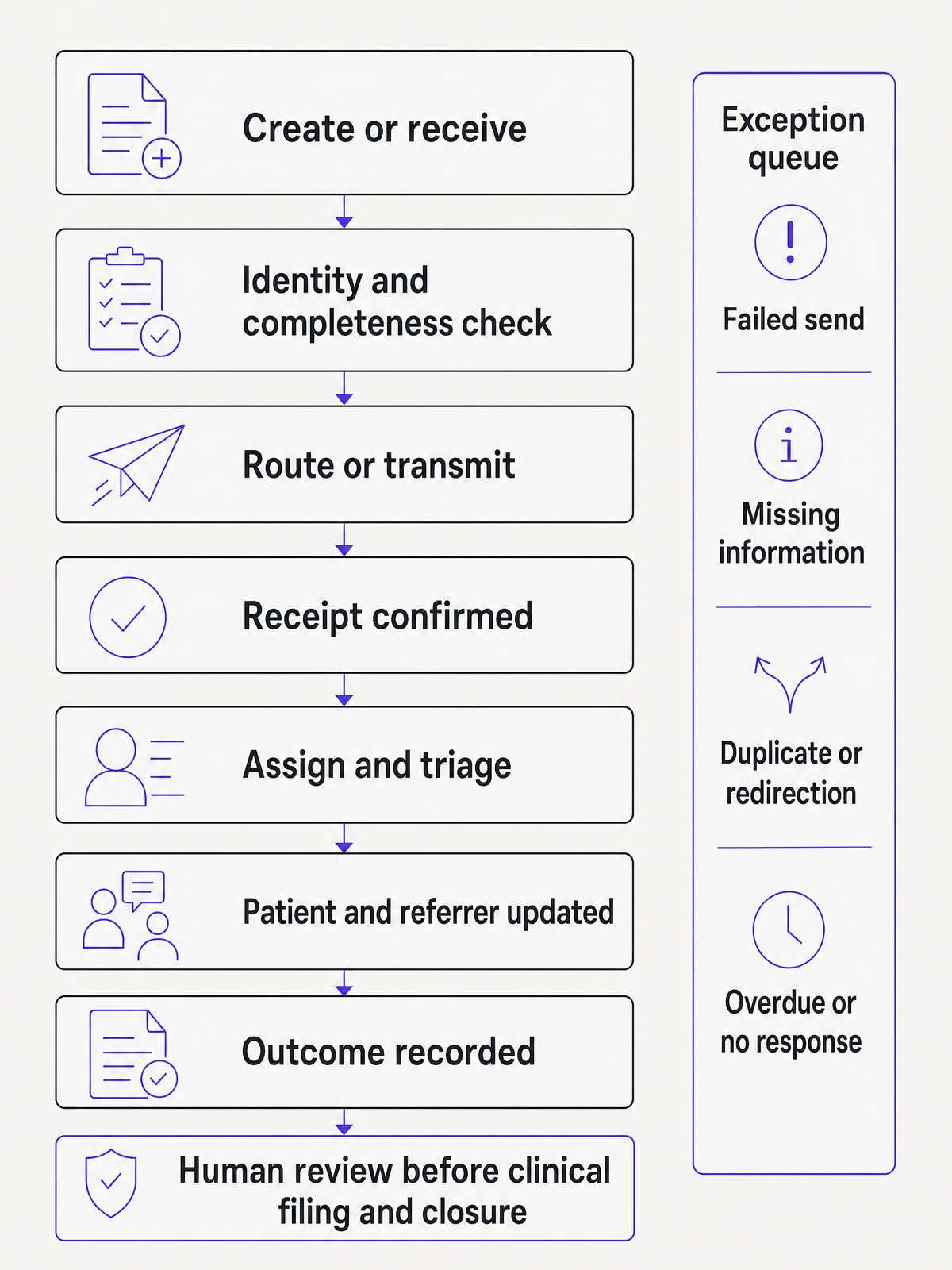
Referral workflow from creation to outcome recording, with a parallel exception queue and human review before clinical filing and closure

This is a practical model for evaluation, not a mandated national sequence. Receiving services set their own criteria, urgency processes and accepted routes. Emergency and urgent pathways also require their own procedures.

A receipt is one event, not a completed referral

The Agency's secure messaging guidance describes encrypted delivery through messaging providers and an alert when the receiving clinical information system has successfully received a message. That receipt is useful audit evidence. It does not prove completeness, clinical triage, acceptance, booking, patient contact or transfer of clinical responsibility.

Track those events separately. A task should only close at the endpoint your organisation has defined, with exceptions returned to active work. For example, “delivered” may close a transmission task while leaving a referral-monitoring task open until the service responds.

Look for the handoffs where work becomes invisible

Referrals commonly stall at boundaries rather than within the referral letter itself. Examine:

  • a draft waiting for clinical sign-off
  • a submitted form parked in an error queue
  • a technical receipt mistaken for clinical acceptance
  • an incoming document that cannot be matched confidently to a patient
  • a request for more information sent to an unmonitored inbox
  • a duplicate handled differently across two queues
  • a redirection with no confirmed new owner
  • an outcome letter filed without clinical review
  • an overdue referral known only to one staff member

Software should make the important boundary visible or leave a reliable task in the system where your team works. If a product simply moves the blind spot, it has not solved the workflow problem.

What to look for in referral management software

Turn demonstrations into workflow tests. Give each supplier the same routine and exception scenarios, then record what happens at every handoff.

Area Questions to ask
Workflow fit Which sending and receiving stages are in scope? Can you configure owners, statuses, local thresholds, absence cover and escalation without losing the audit trail?
Destinations and criteria Which services, directories, forms and channels are supported? How are catchment, eligibility and referral criteria maintained? What happens when a destination changes its route?
Integration depth Which versions of your clinical and practice software are supported? Does the connection pre-populate data, launch in context, attach documents, write status back or file correspondence? Which steps still require copying or a second login?
Identity and completeness How are patient, provider and organisation identities matched? Can staff see the source data and confidence or validation result? What happens when the match is uncertain or a mandatory item is missing?
Receipt and status Which statuses come from the receiving endpoint, which are entered by staff and which are inferred? Can users see the timestamp, source and meaning of each status?
Exceptions How does the system handle failed sends, duplicates, missing information, misdirection, redirection, decline, downtime and returned correspondence? Can unresolved items be filtered by risk, owner and time open?
Communication Which updates go to patients and referrers, through what channel and in which languages or accessible formats? How are failed messages, safe-contact needs and communication preferences handled?
Privacy, security and audit How is information protected in transit and at rest? How do role-based access, authentication, audit logs, data location, retention, incident response and subcontractors fit your obligations and risk assessment?
Clinical governance Where is clinician review required? Can the service preserve clinical judgement, current criteria and urgent escalation outside the routine workflow? How are changes tested and approved?
Implementation and support Who maps and configures the workflow, migrates active referrals, trains each role and supports go-live? What are the response times, downtime arrangements and exit process?
Total cost What is charged for setup, interfaces, messaging, users, volume, SMS, training, support, reporting, upgrades and data export? What contract term and price-review provisions apply?

Do not treat “integrated” as a sufficient answer. Ask the supplier to show the exact fields and documents that cross each boundary, where reviewed information writes back and how a mismatch or outage appears to staff. Our healthcare data integration guide goes deeper into identity, write-back, authoritative records and exception handling.

Keep Australian standards and local rules in scope

The Agency's referral-system guidance uses must and should deliberately. For example, it says software must address specified cybersecurity, privacy, identification and conformance requirements, while some data-sharing capabilities are expressed as should requirements. It also points to state and territory requirements. Preserve that language when building requirements, and apply it to the intended system scope and location.

One certification badge or a supplier's broad “Australian compliant” claim cannot answer every procurement question. Ask which requirement, legislation, conformance profile, care setting and product module the evidence covers. Privacy obligations can vary with the organisation and jurisdiction.

For primary and community healthcare services using the relevant standard, Action 3.27 of the Australian Commission on Safety and Quality in Health Care's Clinical Safety Standard calls for best-practice structured communication processes when referring patients to other services and collaborating with other care providers. It also calls for consideration of the patient's risks, goals and preferences, and communication of information that is current, comprehensive and accurate. Apply the standard according to its scope. It is not a universal software specification for every practice.

If a supplier discusses National Safety and Quality Health Service (NSQHS) Standards accreditation, check whether your care setting is in scope. The Commission says the second edition remains current while a third edition is developed. A draft future edition should not be presented as an in-force requirement.

How to assess a referral management system pilot

A useful pilot starts with a baseline and ends with evidence about care workflow. It should test failures as deliberately as routine cases.

1. Define the pilot boundary

Choose one or two referral pathways with enough volume and variation to expose real work. Record where the pilot begins and ends, which roles participate, which systems remain authoritative and who owns unresolved items during the pilot.

2. Baseline the current process

Measure a consistent period before go-live. Define each measure in advance, including its numerator, denominator, data source, owner and exclusions. Avoid treating referral volume as proof that care progressed.

3. Test routine and exception cases

Include:

  • a complete routine referral
  • required information or an attachment missing
  • a possible duplicate
  • a patient identity mismatch
  • an incorrect destination or redirection
  • a request for further information
  • a declined referral
  • a failed patient message
  • user absence and reassignment
  • interface, internet or platform downtime
  • returned correspondence requiring clinical review

Use test or simulated patient data approved for the environment. Do not introduce real patient information simply to exercise a scenario.

4. Measure locally meaningful outcomes

Measure A workable definition
Confirmed receipt Referrals with destination receipt evidence divided by referrals sent through an in-scope channel
Time to assignment or triage Median time from a defined start event to documented assignment or triage outcome
Incomplete or returned referrals Referrals requiring more information or correction divided by referrals submitted
Duplicate or misdirected referrals Confirmed duplicates or incorrect destinations divided by in-scope referrals
Unresolved past threshold Open referrals older than the locally set threshold, reported by owner and risk category
Patient or referrer notification Referrals with the required update recorded divided by referrals that reached the relevant status

There is no universal urgent-referral timeframe for a software pilot. Use the receiving service's current pathway and your organisation's clinical governance. Compare the pilot with its baseline, examine the outliers and review near misses as well as averages.

5. Set go-live gates

Agree in advance what would stop or delay rollout. Examples include unsafe identity matching, invisible failed sends, missing audit history, unreliable downtime recovery, unresolved privacy or security findings, and staff being unable to identify the owner of an overdue referral. A time saving does not outweigh a new clinical blind spot.

Where Lyrebird fits in a referral workflow

Clinical judgement and a visible next step for the patient must remain clear when documentation tools support referral work.

Lyrebird is a clinical AI platform that supports adjacent documentation and document-handling work. It is not an end-to-end referral management system.

Our Documents & Letters workflow can use a clinical note and patient information to create a referral draft, populate a PDF from consult information and use practice templates. Every output is reviewed and approved before it goes anywhere: Lyrebird prepares the draft, and the clinician reviews, edits and approves it. The practice then sends an approved referral through the destination's accepted route.

On the receiving-document side, Document Sorter can extract patient and clinician details from supported incoming documents, propose a patient match and let staff review before filing into Bp Premier. It requires a Bp Premier integration and a Lyrebird account. It does not accept or triage a referral, manage a waitlist, book a patient or monitor the referral's status with the receiving service.

These boundaries make the system decision clearer. Choose referral management software for routing, queues, triage and status control when those are the gaps. Use documentation and document-handling tools for the reviewed clinical content and supported filing steps they cover. For Lyrebird's supported clinical-system connections, review our integration options. These connections do not establish eReferral-network routing.

The right setup leaves each referral with accurate information, a visible owner, a meaningful status and a managed next step for the patient.

Contact us to discuss Lyrebird's clinician-reviewed documentation and document-handling workflows.

More Resources
Continue reading
Posts
The dangers of Copy Paste Scribes
Read More
Posts
How to use an AI medical scribe
Read More
Posts
December Product Updates
Read More
Education
Healthcare Interoperability in Australia: A Practical Guide
Read More
Education
eReferral in Australia: A Practical Guide for Clinicians
Read More
Education
Medical Clearance Certificate for Work: Australian Guide
Read More
Post
5 min read

Healthcare Referral Management Systems: An Australian Guide

Published on
October 6, 2026
Referral management systems
Contributors
Subscribe to our newsletter
Read about our privacy policy.
Thank you! Your submission has been received!
Oops! Something went wrong while submitting the form.

A referral can be clinically sound and still stall between preparation, delivery, triage and follow-up. For practice managers, referral coordinators, owners and clinicians, the first buying question is therefore practical: do you need to send referrals, receive them, or manage both directions? The answer determines whether you need a document tool, an eReferral channel, a receiving queue or a broader referral management system.

What is a referral management system?

A healthcare referral management system coordinates work around a request for one healthcare provider to assess or treat a patient. Its scope can run from a simple incoming worklist to a system that supports intake, completeness checks, assignment, triage, patient communication, booking status and outcome tracking.

The term does not describe one standard Australian product category. The Australian Digital Health Agency defines referral systems broadly as systems that enable communication between clinicians to request a health service. Individual products and public programs cover different parts of that work.

Three components are often confused:

Component What it does What it does not establish on its own
Referral document Carries the clinical request, patient information and relevant attachments That the destination received, accepted or acted on the request
eReferral or secure delivery channel Transmits the referral through an accepted digital route and may return a delivery receipt That a clinician has triaged it, the service has accepted it or the patient has an appointment
Referral management system Coordinates defined stages such as intake, ownership, triage, exceptions, communication and closure Every possible stage, unless the product and local implementation explicitly include it

This distinction matters in procurement. A polished referral form may solve completeness at the sending end while leaving the receiving team with a shared inbox. A receiving queue may make triage visible without helping referrers find the right service. Some implementations connect both sides, but you need to confirm the actual coverage rather than infer it from the product name.

Send-side, receive-side and end-to-end scope

Send-side systems help a practice find an accepted route, prepare the referral, validate required fields, attach documents, transmit it and record evidence of sending. For the separate steps involved in this process, use our Australian eReferral guide.

Receive-side systems bring incoming referrals into a worklist, check identity and completeness, assign an owner, support administrative review or clinical triage, manage requests for more information and record an outcome.

Broader systems may connect sending, receiving, patient updates, booking or waitlist status, reporting and returned correspondence. “End-to-end” should still be unpacked stage by stage. Ask where each status comes from, which organisation owns it and whether staff can act on exceptions without opening another system.

NSW shows how these functions can be separate. Within Engage Outpatients, standardised eReferral forms send information into an electronic Referral Management System (eRMS), while the eRMS supports referral management and triage. The named NSW implementation also includes functions such as duplicate detection, redirection, notifications and optional electronic medical record integration. That is one public outpatient program, not a feature baseline for every Australian system or destination.

Map the referral workflow before comparing software

Start with your current process. Follow real referrals across the systems, inboxes and people involved, including the cases that were incomplete, misdirected or delayed. A useful working map is:

  1. Create or receive: capture the request and its source.
  2. Identify and check: match the patient, referrer and intended service, then check required information and attachments.
  3. Route or transmit: use the destination's current accepted pathway.
  4. Confirm receipt: record delivery evidence or identify a failed send.
  5. Assign and triage: make the responsible person, queue and clinical or administrative decision visible.
  6. Resolve exceptions: request missing information, remove duplicates, redirect misrouted referrals and escalate overdue work.
  7. Communicate: update the patient and referrer at the locally agreed stages.
  8. Record the outcome: document acceptance, decline, waitlist or booking status and return correspondence to the patient record for review.

Referral workflow from creation to outcome recording, with a parallel exception queue and human review before clinical filing and closure

This is a practical model for evaluation, not a mandated national sequence. Receiving services set their own criteria, urgency processes and accepted routes. Emergency and urgent pathways also require their own procedures.

A receipt is one event, not a completed referral

The Agency's secure messaging guidance describes encrypted delivery through messaging providers and an alert when the receiving clinical information system has successfully received a message. That receipt is useful audit evidence. It does not prove completeness, clinical triage, acceptance, booking, patient contact or transfer of clinical responsibility.

Track those events separately. A task should only close at the endpoint your organisation has defined, with exceptions returned to active work. For example, “delivered” may close a transmission task while leaving a referral-monitoring task open until the service responds.

Look for the handoffs where work becomes invisible

Referrals commonly stall at boundaries rather than within the referral letter itself. Examine:

  • a draft waiting for clinical sign-off
  • a submitted form parked in an error queue
  • a technical receipt mistaken for clinical acceptance
  • an incoming document that cannot be matched confidently to a patient
  • a request for more information sent to an unmonitored inbox
  • a duplicate handled differently across two queues
  • a redirection with no confirmed new owner
  • an outcome letter filed without clinical review
  • an overdue referral known only to one staff member

Software should make the important boundary visible or leave a reliable task in the system where your team works. If a product simply moves the blind spot, it has not solved the workflow problem.

What to look for in referral management software

Turn demonstrations into workflow tests. Give each supplier the same routine and exception scenarios, then record what happens at every handoff.

Area Questions to ask
Workflow fit Which sending and receiving stages are in scope? Can you configure owners, statuses, local thresholds, absence cover and escalation without losing the audit trail?
Destinations and criteria Which services, directories, forms and channels are supported? How are catchment, eligibility and referral criteria maintained? What happens when a destination changes its route?
Integration depth Which versions of your clinical and practice software are supported? Does the connection pre-populate data, launch in context, attach documents, write status back or file correspondence? Which steps still require copying or a second login?
Identity and completeness How are patient, provider and organisation identities matched? Can staff see the source data and confidence or validation result? What happens when the match is uncertain or a mandatory item is missing?
Receipt and status Which statuses come from the receiving endpoint, which are entered by staff and which are inferred? Can users see the timestamp, source and meaning of each status?
Exceptions How does the system handle failed sends, duplicates, missing information, misdirection, redirection, decline, downtime and returned correspondence? Can unresolved items be filtered by risk, owner and time open?
Communication Which updates go to patients and referrers, through what channel and in which languages or accessible formats? How are failed messages, safe-contact needs and communication preferences handled?
Privacy, security and audit How is information protected in transit and at rest? How do role-based access, authentication, audit logs, data location, retention, incident response and subcontractors fit your obligations and risk assessment?
Clinical governance Where is clinician review required? Can the service preserve clinical judgement, current criteria and urgent escalation outside the routine workflow? How are changes tested and approved?
Implementation and support Who maps and configures the workflow, migrates active referrals, trains each role and supports go-live? What are the response times, downtime arrangements and exit process?
Total cost What is charged for setup, interfaces, messaging, users, volume, SMS, training, support, reporting, upgrades and data export? What contract term and price-review provisions apply?

Do not treat “integrated” as a sufficient answer. Ask the supplier to show the exact fields and documents that cross each boundary, where reviewed information writes back and how a mismatch or outage appears to staff. Our healthcare data integration guide goes deeper into identity, write-back, authoritative records and exception handling.

Keep Australian standards and local rules in scope

The Agency's referral-system guidance uses must and should deliberately. For example, it says software must address specified cybersecurity, privacy, identification and conformance requirements, while some data-sharing capabilities are expressed as should requirements. It also points to state and territory requirements. Preserve that language when building requirements, and apply it to the intended system scope and location.

One certification badge or a supplier's broad “Australian compliant” claim cannot answer every procurement question. Ask which requirement, legislation, conformance profile, care setting and product module the evidence covers. Privacy obligations can vary with the organisation and jurisdiction.

For primary and community healthcare services using the relevant standard, Action 3.27 of the Australian Commission on Safety and Quality in Health Care's Clinical Safety Standard calls for best-practice structured communication processes when referring patients to other services and collaborating with other care providers. It also calls for consideration of the patient's risks, goals and preferences, and communication of information that is current, comprehensive and accurate. Apply the standard according to its scope. It is not a universal software specification for every practice.

If a supplier discusses National Safety and Quality Health Service (NSQHS) Standards accreditation, check whether your care setting is in scope. The Commission says the second edition remains current while a third edition is developed. A draft future edition should not be presented as an in-force requirement.

How to assess a referral management system pilot

A useful pilot starts with a baseline and ends with evidence about care workflow. It should test failures as deliberately as routine cases.

1. Define the pilot boundary

Choose one or two referral pathways with enough volume and variation to expose real work. Record where the pilot begins and ends, which roles participate, which systems remain authoritative and who owns unresolved items during the pilot.

2. Baseline the current process

Measure a consistent period before go-live. Define each measure in advance, including its numerator, denominator, data source, owner and exclusions. Avoid treating referral volume as proof that care progressed.

3. Test routine and exception cases

Include:

  • a complete routine referral
  • required information or an attachment missing
  • a possible duplicate
  • a patient identity mismatch
  • an incorrect destination or redirection
  • a request for further information
  • a declined referral
  • a failed patient message
  • user absence and reassignment
  • interface, internet or platform downtime
  • returned correspondence requiring clinical review

Use test or simulated patient data approved for the environment. Do not introduce real patient information simply to exercise a scenario.

4. Measure locally meaningful outcomes

Measure A workable definition
Confirmed receipt Referrals with destination receipt evidence divided by referrals sent through an in-scope channel
Time to assignment or triage Median time from a defined start event to documented assignment or triage outcome
Incomplete or returned referrals Referrals requiring more information or correction divided by referrals submitted
Duplicate or misdirected referrals Confirmed duplicates or incorrect destinations divided by in-scope referrals
Unresolved past threshold Open referrals older than the locally set threshold, reported by owner and risk category
Patient or referrer notification Referrals with the required update recorded divided by referrals that reached the relevant status

There is no universal urgent-referral timeframe for a software pilot. Use the receiving service's current pathway and your organisation's clinical governance. Compare the pilot with its baseline, examine the outliers and review near misses as well as averages.

5. Set go-live gates

Agree in advance what would stop or delay rollout. Examples include unsafe identity matching, invisible failed sends, missing audit history, unreliable downtime recovery, unresolved privacy or security findings, and staff being unable to identify the owner of an overdue referral. A time saving does not outweigh a new clinical blind spot.

Where Lyrebird fits in a referral workflow

Clinical judgement and a visible next step for the patient must remain clear when documentation tools support referral work.

Lyrebird is a clinical AI platform that supports adjacent documentation and document-handling work. It is not an end-to-end referral management system.

Our Documents & Letters workflow can use a clinical note and patient information to create a referral draft, populate a PDF from consult information and use practice templates. Every output is reviewed and approved before it goes anywhere: Lyrebird prepares the draft, and the clinician reviews, edits and approves it. The practice then sends an approved referral through the destination's accepted route.

On the receiving-document side, Document Sorter can extract patient and clinician details from supported incoming documents, propose a patient match and let staff review before filing into Bp Premier. It requires a Bp Premier integration and a Lyrebird account. It does not accept or triage a referral, manage a waitlist, book a patient or monitor the referral's status with the receiving service.

These boundaries make the system decision clearer. Choose referral management software for routing, queues, triage and status control when those are the gaps. Use documentation and document-handling tools for the reviewed clinical content and supported filing steps they cover. For Lyrebird's supported clinical-system connections, review our integration options. These connections do not establish eReferral-network routing.

The right setup leaves each referral with accurate information, a visible owner, a meaningful status and a managed next step for the patient.

Contact us to discuss Lyrebird's clinician-reviewed documentation and document-handling workflows.

Keep reading

All posts
Questions about compliance?