Education
5 min read

eReferral in Australia: A Practical Guide for Clinicians

Published on
October 2, 2026
eReferral in Australia title card on a violet Lyrebird Health background
Contributors
Lyrebird Health
Subscribe to our newsletter
Read about our privacy policy.
Thank you! Your submission has been received!
Oops! Something went wrong while submitting the form.

An eReferral can move a patient's information to the right service securely and give the practice a clearer trail to follow. The safety benefit depends on what happens around the send button: choosing the correct pathway, reviewing the clinical content, acting on status messages and keeping the patient informed. Australian clinicians and practice teams therefore need a complete workflow from referral decision to documented closure.

What is an eReferral?

An electronic referral, usually written eReferral, is a digital request from one healthcare provider to another for further assessment, diagnosis or treatment. It carries clinical and administrative information through an electronic system rather than relying on a paper form, post or fax. The Australian Digital Health Agency's current eReferral specification defines the document as a way to transmit significant patient information to another treating provider.

An eReferral is more than a referral letter saved as a PDF. Depending on the service and system, it may use structured fields, check mandatory information, pull selected data from the patient record, transmit attachments securely and return status notifications.

It also has clear boundaries:

  • It is a request, not an appointment. The receiving service may need to validate, triage, accept, redirect or decline it before booking.
  • A delivery receipt is not clinical acceptance. It confirms a technical event, which may be only one step in the receiving workflow.
  • My Health Record is not necessarily the delivery route. An eReferral is sent directly to the intended recipient. A copy may also be uploaded to the patient's digital health record.
  • It does not replace clinical judgement. Structured fields and pre-populated data still need review for relevance, accuracy and currency.

How the end-to-end eReferral flow works

Screens and status labels differ between services, states and software. A safe workflow still needs the same core checks. The diagram groups them into six stages; the detailed steps below treat patient communication as its own step and show where clinical handovers sit.
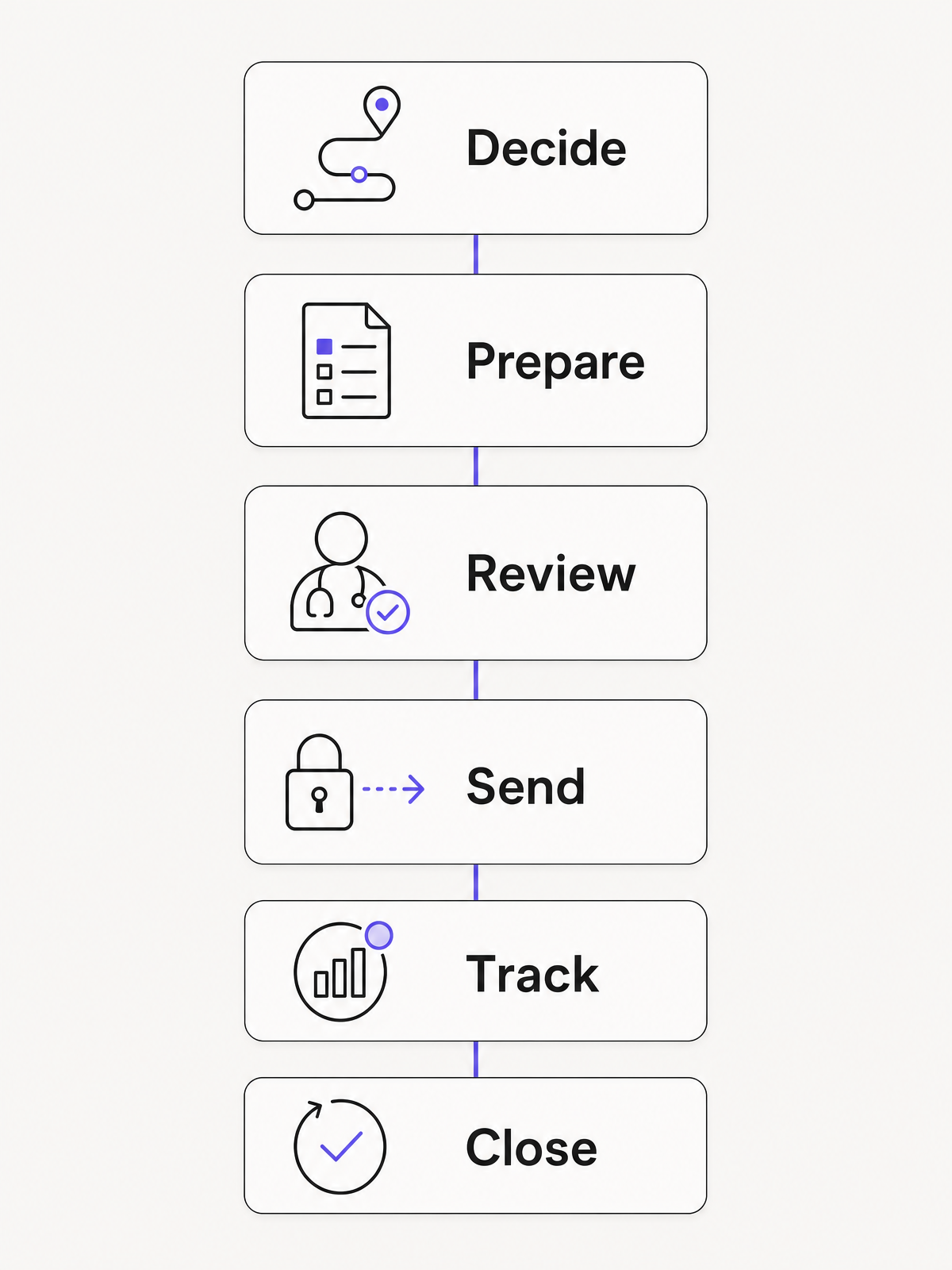
Condensed eReferral workflow: decide, prepare, review, send, track and close

1. Choose the pathway and destination

Confirm what the patient needs, which service is appropriate, whether the service accepts the patient's referral type and which channel it currently accepts. Use the destination's current referral criteria, service directory and catchment rules.

An eReferral is generally part of a planned referral workflow. If the patient needs emergency care, use the emergency pathway. For a stable patient who needs urgent assessment, follow the service's urgent process, which may also require a phone call. Western Sydney Local Health District, for example, separates emergency care from stable urgent referrals and advises clinicians to call the service in most urgent cases.

2. Explain the plan to the patient

Discuss why the referral is being made, where it is going, what information will be shared, expected next steps and what the patient should do if their condition changes. Record any agreement or authority required for the specific pathway, along with communication, interpreter, carer and accessibility needs.

Give the patient a realistic expectation. Submission may start triage; it does not guarantee acceptance, priority, timing or a particular clinician.

3. Build the referral from current information

Select the correct patient and referral form, then bring in only information relevant to the request. Add the clinical question, urgency, current management and service-specific criteria. Attach readable results or reports when the receiving service requires them.

Pre-population reduces re-entry, but it can also reproduce stale contact details, ceased medicines, outdated problem lists or irrelevant history. Treat imported data as material to verify.

4. Review and approve the clinical content

The referring clinician reviews the destination, patient identity, purpose, urgency, clinical facts, attachments and follow-up plan before sign-off. This remains necessary when another team member prepares the form or the first draft is produced with clinical AI.

For Medicare-related electronic referrals, Services Australia states that a handwritten signature is unnecessary when the method identifies the signer and shows their intention to approve the referral. The recipient must agree to accept the electronic format. You must also save, store and retain access to the referral so it can be retrieved unaltered. See the current electronic referral requirements.

5. Send through an accepted secure channel

Transmit the referral through the destination's approved eReferral platform, integrated form, portal or secure messaging channel. Record the submitted referral and attachments in the patient record, including the destination and date.

The Australian Digital Health Agency explains that secure messaging encrypts the message between providers and can return an alert when the receiving clinical system has received it. Unsecured or unencrypted email lacks the same built-in security, auditability and clinical-system integration.

6. Monitor validation, triage and booking

Route all acknowledgements, requests for more information, rejections and status updates into a queue with a named owner and cover for absence. Respond within the receiving service's timeframe. Escalate overdue or clinically concerning referrals through the pathway defined by the service and your practice.

7. Close the loop

A safe endpoint is clear and documented: the referral was accepted or redirected appropriately, the patient knows the outcome and next step, interim care has an owner, and any specialist correspondence returns to the patient record for clinician review.

If a service declines the referral, asks for more information or cannot contact the patient, the referral returns to active work. It is not a closed case.

What information should an eReferral include?

Mandatory information varies by destination and presenting problem. The Victorian Department of Health publishes one of Australia's most detailed minimum referral information frameworks. It is a useful practical baseline, while the current criteria for the receiving service remain authoritative.

Information group Practical minimum to verify
Patient identity and contact Full name, date of birth, address, reliable contact details, preferred communication method, Medicare number if relevant, and usual GP when different from the referrer
Access and support needs Interpreter, carer or decision-maker details, accessibility needs, cultural safety considerations, transport constraints and any safe-contact requirements
Referrer and referral details Referral date, clinician and organisation name, provider number when required, address, direct contact details and preferred method for clinical queries
Referral purpose The service requested, the specific clinical question or requested action, presenting problem or working diagnosis, and the effect on function or daily life
Urgency and risk The clinician's assessment of urgency, relevant red flags, immediate risks, safety-netting and the interim management plan
Current clinical picture Relevant history, examination findings, current and previous treatment and response, complete current medicines, allergies and adverse reactions
Investigations Relevant results, reports or images, dates, outstanding tests and who will review pending results
Patient involvement Evidence required by the pathway that the referral and information sharing have been discussed and agreed, plus the patient's preferences and relevant support people
Destination criteria Every mandatory field, prerequisite investigation and attachment required by the current statewide, local or service-specific criteria

This is a completeness check for the eReferral workflow. For detailed advice on writing the clinical question and selecting relevant context, use our referral letter guide.

How to send an eReferral in Australia

Australia does not use one universal eReferral screen. The available route depends on the destination, jurisdiction, referral type and your clinical software.

For example, NSW Health eReferral forms work inside compatible practice management systems or through a browser portal. The compatible software route can pre-populate information, validate the form, transmit it and return an electronic receipt. Queensland Health provides Smart Referrals resources for creating, updating, tracking and withdrawing referrals. Tasmania uses HealthLink Smart Forms connected to the public hospital referral management system. These examples show why the receiving service's instructions should determine the route.

The practical sending sequence is:

  1. Open the patient record and select the receiving service's current form or secure address.
  2. Check the patient, referrer and practice details that the system has inserted.
  3. Complete all mandatory and condition-specific fields.
  4. Attach only the required, current and readable documents.
  5. Review clinical content, urgency, destination and electronic approval.
  6. Submit through the approved channel.
  7. Confirm that the referral moved out of drafts, parked forms or an error queue.
  8. Save the submitted version and delivery evidence to the patient record.
  9. Tell the patient what acknowledgement to expect, who will contact them and when your practice will follow up.

Keep a documented alternative for downtime, failed transmission and destinations that do not accept your usual platform. A fallback channel still needs appropriate privacy controls, a record of what was sent and a follow-up check.

Track the status, not just the send

Status labels vary between systems. As a risk control, decide what each status proves before staff use it to close a task.

Status stage What it usually proves What it does not prove
Draft or parked Work has been saved The referral has left the practice
Submitted The sender initiated transmission The destination received or accepted it
Delivered or received The technical system or receiving endpoint acknowledged receipt A clinician has triaged it, the service will accept it or an appointment exists
More information requested The receiving team cannot complete its decision with the current information The original referral is progressing without action from the referrer
Accepted or triaged The receiving service has made a clinical or administrative decision to progress it The appointment has been booked or the patient has been contacted
Declined, rejected or redirected The original pathway will not proceed as submitted Another service has taken responsibility unless that transfer is confirmed
Booked or waitlisted The patient has entered a scheduling process Attendance, assessment or treatment has occurred
Outcome correspondence received A report or letter has returned The result has been clinically reviewed and any actions completed

NSW Health's eReferral guidance distinguishes confirmation that a form was sent from notification that the outpatient service received it. Tasmania's public eReferral workflow also uses separate outcomes such as acceptance, decline and requests for more information. Those distinctions are a strong model for a practice tracking register.

Safety, privacy and clinical governance

eReferral governance needs both technical controls and reliable clinical and administrative processes.

Keep responsibility explicit

Do not assume that a receipt transfers responsibility for the patient's care. Define who manages symptoms, pending results and escalation until the receiving service accepts the referral or another handover is agreed. The Australian Commission on Safety and Quality in Health Care emphasises clear responsibility and accountability when care moves between providers.

Protect the information throughout its lifecycle

Use approved secure channels, role-based access, individual accounts, appropriate authentication and audit logs. Review who can prepare, send, amend, cancel and monitor referrals. For organisations covered by the Australian Privacy Principles (APPs), APP 11 requires reasonable steps in the circumstances to protect personal information they hold from misuse, interference and loss, and from unauthorised access, modification or disclosure. The Office of the Australian Information Commissioner's APP 11 guidance also makes security an information-lifecycle issue, including third-party providers and staff procedures.

Design for exceptions

Maintain one visible queue for failed sends, parked forms, missing information, declined referrals, overdue acknowledgements and returned correspondence. Give each exception an owner, expected response time and escalation route. Set a review frequency that matches clinical risk. Active referral queues will often need review every clinical day rather than relying on individual memory.

Make automation reviewable

Templates, record integration and clinical AI can reduce repeated typing. They can also propagate an omission or contradiction at speed. Keep the source visible, make imported fields easy to check and require clinician review before sign-off. If AI supports drafting, the output remains a draft for clinician editing and approval.

Test urgent and downtime pathways

Document which situations need a phone call, direct clinician-to-clinician discussion, emergency department referral or ambulance response. Test what happens when the eReferral platform, internet connection or destination directory is unavailable. Staff should be able to find the approved fallback without improvising.

A practical implementation plan for practices

Start with the referral pathways your team uses most, then expand once the controls work.

  1. Map the current journey. Follow a referral from clinical decision to returned correspondence. Record every system, inbox, handover and duplicate entry.
  2. Confirm destinations and channels. Build a controlled directory of services, accepted methods, eligibility, catchment, urgent contacts and current criteria. Name an owner for updates.
  3. Set role boundaries. Define who chooses the pathway, prepares the form, approves clinical content, submits, checks receipts, answers requests and contacts the patient.
  4. Standardise the minimum. Configure service-specific templates and prompts around required information. Avoid a single generic form for every specialty.
  5. Create one exception queue. Bring technical failures and clinical responses into a daily worklist with absence cover.
  6. Prepare patient communication. Use consistent wording for what was sent, what happens next, expected timeframes and when to contact the practice or seek urgent help.
  7. Pilot and rehearse. Test routine, urgent, declined, missing-information and downtime scenarios with a small group before wider rollout.
  8. Audit the closed loop. Review referral records for clinical completeness, confirmed delivery, timely response to exceptions, patient notification and returned correspondence.

Useful measures include the percentage of referrals with a delivery acknowledgement, median time from submission to triage outcome, missing-information and rejection rates, unresolved referrals beyond the local threshold, and the time taken to review returned correspondence. Submission volume alone does not show whether care progressed.

Where Lyrebird fits in the workflow

Lyrebird is a clinical AI platform that supports the preparation and documentation part of this process. Our Documents & Letters workflow can use consult content and patient information to produce a referral draft in a practice template. The clinician reviews, edits and approves the draft, then the practice uses the destination's accepted eReferral or secure messaging channel to send and track it.

This separation matters. A structured drafting workflow keeps the clinician's attention on the clinical question, urgency and follow-up plan. It does not replace service criteria, secure transmission, receipt monitoring or clinical responsibility.

The safer unit of work is a completed referral loop: the right destination, clinically reviewed information, confirmed receipt, managed exceptions and a patient who knows what happens next.

Contact us to discuss a clinician-reviewed referral documentation workflow for your practice.

More Resources
Continue reading
Posts
The dangers of Copy Paste Scribes
Read More
Posts
How to use an AI medical scribe
Read More
Posts
December Product Updates
Read More
Education
Medical Clearance Certificate for Work: Australian Guide
Read More
Education
NDIS Supporting Evidence Form: A Clinician’s Guide
Read More
Education
Patient Notification and Follow-Up of Abnormal Test Results
Read More
Post
5 min read

eReferral in Australia: A Practical Guide for Clinicians

Published on
October 2, 2026
eReferral in Australia title card on a violet Lyrebird Health background
Contributors
Lyrebird Health
Subscribe to our newsletter
Read about our privacy policy.
Thank you! Your submission has been received!
Oops! Something went wrong while submitting the form.

An eReferral can move a patient's information to the right service securely and give the practice a clearer trail to follow. The safety benefit depends on what happens around the send button: choosing the correct pathway, reviewing the clinical content, acting on status messages and keeping the patient informed. Australian clinicians and practice teams therefore need a complete workflow from referral decision to documented closure.

What is an eReferral?

An electronic referral, usually written eReferral, is a digital request from one healthcare provider to another for further assessment, diagnosis or treatment. It carries clinical and administrative information through an electronic system rather than relying on a paper form, post or fax. The Australian Digital Health Agency's current eReferral specification defines the document as a way to transmit significant patient information to another treating provider.

An eReferral is more than a referral letter saved as a PDF. Depending on the service and system, it may use structured fields, check mandatory information, pull selected data from the patient record, transmit attachments securely and return status notifications.

It also has clear boundaries:

  • It is a request, not an appointment. The receiving service may need to validate, triage, accept, redirect or decline it before booking.
  • A delivery receipt is not clinical acceptance. It confirms a technical event, which may be only one step in the receiving workflow.
  • My Health Record is not necessarily the delivery route. An eReferral is sent directly to the intended recipient. A copy may also be uploaded to the patient's digital health record.
  • It does not replace clinical judgement. Structured fields and pre-populated data still need review for relevance, accuracy and currency.

How the end-to-end eReferral flow works

Screens and status labels differ between services, states and software. A safe workflow still needs the same core checks. The diagram groups them into six stages; the detailed steps below treat patient communication as its own step and show where clinical handovers sit.

Condensed eReferral workflow: decide, prepare, review, send, track and close

1. Choose the pathway and destination

Confirm what the patient needs, which service is appropriate, whether the service accepts the patient's referral type and which channel it currently accepts. Use the destination's current referral criteria, service directory and catchment rules.

An eReferral is generally part of a planned referral workflow. If the patient needs emergency care, use the emergency pathway. For a stable patient who needs urgent assessment, follow the service's urgent process, which may also require a phone call. Western Sydney Local Health District, for example, separates emergency care from stable urgent referrals and advises clinicians to call the service in most urgent cases.

2. Explain the plan to the patient

Discuss why the referral is being made, where it is going, what information will be shared, expected next steps and what the patient should do if their condition changes. Record any agreement or authority required for the specific pathway, along with communication, interpreter, carer and accessibility needs.

Give the patient a realistic expectation. Submission may start triage; it does not guarantee acceptance, priority, timing or a particular clinician.

3. Build the referral from current information

Select the correct patient and referral form, then bring in only information relevant to the request. Add the clinical question, urgency, current management and service-specific criteria. Attach readable results or reports when the receiving service requires them.

Pre-population reduces re-entry, but it can also reproduce stale contact details, ceased medicines, outdated problem lists or irrelevant history. Treat imported data as material to verify.

4. Review and approve the clinical content

The referring clinician reviews the destination, patient identity, purpose, urgency, clinical facts, attachments and follow-up plan before sign-off. This remains necessary when another team member prepares the form or the first draft is produced with clinical AI.

For Medicare-related electronic referrals, Services Australia states that a handwritten signature is unnecessary when the method identifies the signer and shows their intention to approve the referral. The recipient must agree to accept the electronic format. You must also save, store and retain access to the referral so it can be retrieved unaltered. See the current electronic referral requirements.

5. Send through an accepted secure channel

Transmit the referral through the destination's approved eReferral platform, integrated form, portal or secure messaging channel. Record the submitted referral and attachments in the patient record, including the destination and date.

The Australian Digital Health Agency explains that secure messaging encrypts the message between providers and can return an alert when the receiving clinical system has received it. Unsecured or unencrypted email lacks the same built-in security, auditability and clinical-system integration.

6. Monitor validation, triage and booking

Route all acknowledgements, requests for more information, rejections and status updates into a queue with a named owner and cover for absence. Respond within the receiving service's timeframe. Escalate overdue or clinically concerning referrals through the pathway defined by the service and your practice.

7. Close the loop

A safe endpoint is clear and documented: the referral was accepted or redirected appropriately, the patient knows the outcome and next step, interim care has an owner, and any specialist correspondence returns to the patient record for clinician review.

If a service declines the referral, asks for more information or cannot contact the patient, the referral returns to active work. It is not a closed case.

What information should an eReferral include?

Mandatory information varies by destination and presenting problem. The Victorian Department of Health publishes one of Australia's most detailed minimum referral information frameworks. It is a useful practical baseline, while the current criteria for the receiving service remain authoritative.

Information group Practical minimum to verify
Patient identity and contact Full name, date of birth, address, reliable contact details, preferred communication method, Medicare number if relevant, and usual GP when different from the referrer
Access and support needs Interpreter, carer or decision-maker details, accessibility needs, cultural safety considerations, transport constraints and any safe-contact requirements
Referrer and referral details Referral date, clinician and organisation name, provider number when required, address, direct contact details and preferred method for clinical queries
Referral purpose The service requested, the specific clinical question or requested action, presenting problem or working diagnosis, and the effect on function or daily life
Urgency and risk The clinician's assessment of urgency, relevant red flags, immediate risks, safety-netting and the interim management plan
Current clinical picture Relevant history, examination findings, current and previous treatment and response, complete current medicines, allergies and adverse reactions
Investigations Relevant results, reports or images, dates, outstanding tests and who will review pending results
Patient involvement Evidence required by the pathway that the referral and information sharing have been discussed and agreed, plus the patient's preferences and relevant support people
Destination criteria Every mandatory field, prerequisite investigation and attachment required by the current statewide, local or service-specific criteria

This is a completeness check for the eReferral workflow. For detailed advice on writing the clinical question and selecting relevant context, use our referral letter guide.

How to send an eReferral in Australia

Australia does not use one universal eReferral screen. The available route depends on the destination, jurisdiction, referral type and your clinical software.

For example, NSW Health eReferral forms work inside compatible practice management systems or through a browser portal. The compatible software route can pre-populate information, validate the form, transmit it and return an electronic receipt. Queensland Health provides Smart Referrals resources for creating, updating, tracking and withdrawing referrals. Tasmania uses HealthLink Smart Forms connected to the public hospital referral management system. These examples show why the receiving service's instructions should determine the route.

The practical sending sequence is:

  1. Open the patient record and select the receiving service's current form or secure address.
  2. Check the patient, referrer and practice details that the system has inserted.
  3. Complete all mandatory and condition-specific fields.
  4. Attach only the required, current and readable documents.
  5. Review clinical content, urgency, destination and electronic approval.
  6. Submit through the approved channel.
  7. Confirm that the referral moved out of drafts, parked forms or an error queue.
  8. Save the submitted version and delivery evidence to the patient record.
  9. Tell the patient what acknowledgement to expect, who will contact them and when your practice will follow up.

Keep a documented alternative for downtime, failed transmission and destinations that do not accept your usual platform. A fallback channel still needs appropriate privacy controls, a record of what was sent and a follow-up check.

Track the status, not just the send

Status labels vary between systems. As a risk control, decide what each status proves before staff use it to close a task.

Status stage What it usually proves What it does not prove
Draft or parked Work has been saved The referral has left the practice
Submitted The sender initiated transmission The destination received or accepted it
Delivered or received The technical system or receiving endpoint acknowledged receipt A clinician has triaged it, the service will accept it or an appointment exists
More information requested The receiving team cannot complete its decision with the current information The original referral is progressing without action from the referrer
Accepted or triaged The receiving service has made a clinical or administrative decision to progress it The appointment has been booked or the patient has been contacted
Declined, rejected or redirected The original pathway will not proceed as submitted Another service has taken responsibility unless that transfer is confirmed
Booked or waitlisted The patient has entered a scheduling process Attendance, assessment or treatment has occurred
Outcome correspondence received A report or letter has returned The result has been clinically reviewed and any actions completed

NSW Health's eReferral guidance distinguishes confirmation that a form was sent from notification that the outpatient service received it. Tasmania's public eReferral workflow also uses separate outcomes such as acceptance, decline and requests for more information. Those distinctions are a strong model for a practice tracking register.

Safety, privacy and clinical governance

eReferral governance needs both technical controls and reliable clinical and administrative processes.

Keep responsibility explicit

Do not assume that a receipt transfers responsibility for the patient's care. Define who manages symptoms, pending results and escalation until the receiving service accepts the referral or another handover is agreed. The Australian Commission on Safety and Quality in Health Care emphasises clear responsibility and accountability when care moves between providers.

Protect the information throughout its lifecycle

Use approved secure channels, role-based access, individual accounts, appropriate authentication and audit logs. Review who can prepare, send, amend, cancel and monitor referrals. For organisations covered by the Australian Privacy Principles (APPs), APP 11 requires reasonable steps in the circumstances to protect personal information they hold from misuse, interference and loss, and from unauthorised access, modification or disclosure. The Office of the Australian Information Commissioner's APP 11 guidance also makes security an information-lifecycle issue, including third-party providers and staff procedures.

Design for exceptions

Maintain one visible queue for failed sends, parked forms, missing information, declined referrals, overdue acknowledgements and returned correspondence. Give each exception an owner, expected response time and escalation route. Set a review frequency that matches clinical risk. Active referral queues will often need review every clinical day rather than relying on individual memory.

Make automation reviewable

Templates, record integration and clinical AI can reduce repeated typing. They can also propagate an omission or contradiction at speed. Keep the source visible, make imported fields easy to check and require clinician review before sign-off. If AI supports drafting, the output remains a draft for clinician editing and approval.

Test urgent and downtime pathways

Document which situations need a phone call, direct clinician-to-clinician discussion, emergency department referral or ambulance response. Test what happens when the eReferral platform, internet connection or destination directory is unavailable. Staff should be able to find the approved fallback without improvising.

A practical implementation plan for practices

Start with the referral pathways your team uses most, then expand once the controls work.

  1. Map the current journey. Follow a referral from clinical decision to returned correspondence. Record every system, inbox, handover and duplicate entry.
  2. Confirm destinations and channels. Build a controlled directory of services, accepted methods, eligibility, catchment, urgent contacts and current criteria. Name an owner for updates.
  3. Set role boundaries. Define who chooses the pathway, prepares the form, approves clinical content, submits, checks receipts, answers requests and contacts the patient.
  4. Standardise the minimum. Configure service-specific templates and prompts around required information. Avoid a single generic form for every specialty.
  5. Create one exception queue. Bring technical failures and clinical responses into a daily worklist with absence cover.
  6. Prepare patient communication. Use consistent wording for what was sent, what happens next, expected timeframes and when to contact the practice or seek urgent help.
  7. Pilot and rehearse. Test routine, urgent, declined, missing-information and downtime scenarios with a small group before wider rollout.
  8. Audit the closed loop. Review referral records for clinical completeness, confirmed delivery, timely response to exceptions, patient notification and returned correspondence.

Useful measures include the percentage of referrals with a delivery acknowledgement, median time from submission to triage outcome, missing-information and rejection rates, unresolved referrals beyond the local threshold, and the time taken to review returned correspondence. Submission volume alone does not show whether care progressed.

Where Lyrebird fits in the workflow

Lyrebird is a clinical AI platform that supports the preparation and documentation part of this process. Our Documents & Letters workflow can use consult content and patient information to produce a referral draft in a practice template. The clinician reviews, edits and approves the draft, then the practice uses the destination's accepted eReferral or secure messaging channel to send and track it.

This separation matters. A structured drafting workflow keeps the clinician's attention on the clinical question, urgency and follow-up plan. It does not replace service criteria, secure transmission, receipt monitoring or clinical responsibility.

The safer unit of work is a completed referral loop: the right destination, clinically reviewed information, confirmed receipt, managed exceptions and a patient who knows what happens next.

Contact us to discuss a clinician-reviewed referral documentation workflow for your practice.
Keep reading

All posts
Questions about compliance?