Healthcare Document Management Software: An Australian Buyer Guide
Referrals, reports, forms and scanned records can arrive faster than a healthcare team can safely identify, review and file them. Healthcare document management software can help, but the category spans everything from a single filing feature to an enterprise records platform. Australian practice managers, clinicians and health-service teams need to know which problem they are buying for, how the software fits their clinical system and which controls must remain in human hands.
What is healthcare document management software?
Healthcare document management software, often called a healthcare document management system (DMS), controls how an organisation captures, classifies, reviews, finds, shares and manages documents throughout their lifecycle. Depending on its scope, it may handle incoming clinical correspondence, consent forms, scanned records, policies, finance files and other administrative documents.
The National Archives of Australia describes an electronic document and records management system (EDRMS) as software that can manage born-digital, scanned and physical information. Its common functions include classification, search, storage, workflows, access controls, audit trails and accountable disposal. It also recommends defining business and integration requirements before selecting technology. Those functions are a useful category test, although an EDRMS label alone does not prove that a product meets a healthcare organisation's legal or clinical requirements. National Archives guidance explains the wider records context.
How it differs from the systems around it
| System or capability | Primary job | Boundary to preserve |
|---|---|---|
| Healthcare document management system or EDRMS | Capture, index, route, control, retrieve and manage documents and records through an approved lifecycle | It may connect documents to a patient or episode, but it does not automatically replace clinical documentation, prescribing, billing or other clinical-system workflows. |
| Clinical information system, electronic medical record or practice management system | Record and use health information to support care and practice operations | The Australian Digital Health Agency defines a clinical information system as the system clinicians use to document care, review history, manage medicines and share information. A practice management system may also cover appointments, referrals, billing and claims. A document system can support these systems without becoming the system of record. Clinical information system guidance and practice software guidance set out those roles. |
| Interoperability or information exchange | Move data or documents between systems through standards, interfaces and services | A successful transfer does not prove that staff verified the patient and document details, that the document retained its meaning or that clinical review is complete. Transfer status and clinical-review status must remain distinct. |
| File storage or a focused filing feature | Store files or solve one step such as scanning, optical character recognition (OCR), classification or import | A shared drive, cloud folder or single filing tool can be useful. It is only a governed medical document management system if the wider controls, ownership and lifecycle are present. |
This boundary matters in procurement. A practice with one slow intake queue may need a focused workflow improvement. A health service managing documents across sites, teams and repositories may need a dedicated platform with enterprise records controls.
Map one safe document workflow before comparing products
Start with a specific document, such as an incoming specialist letter. Define its path from receipt to the correct patient record, including the cases where automation cannot resolve the match. This exposes the hand-offs and risks that a feature list can hide.
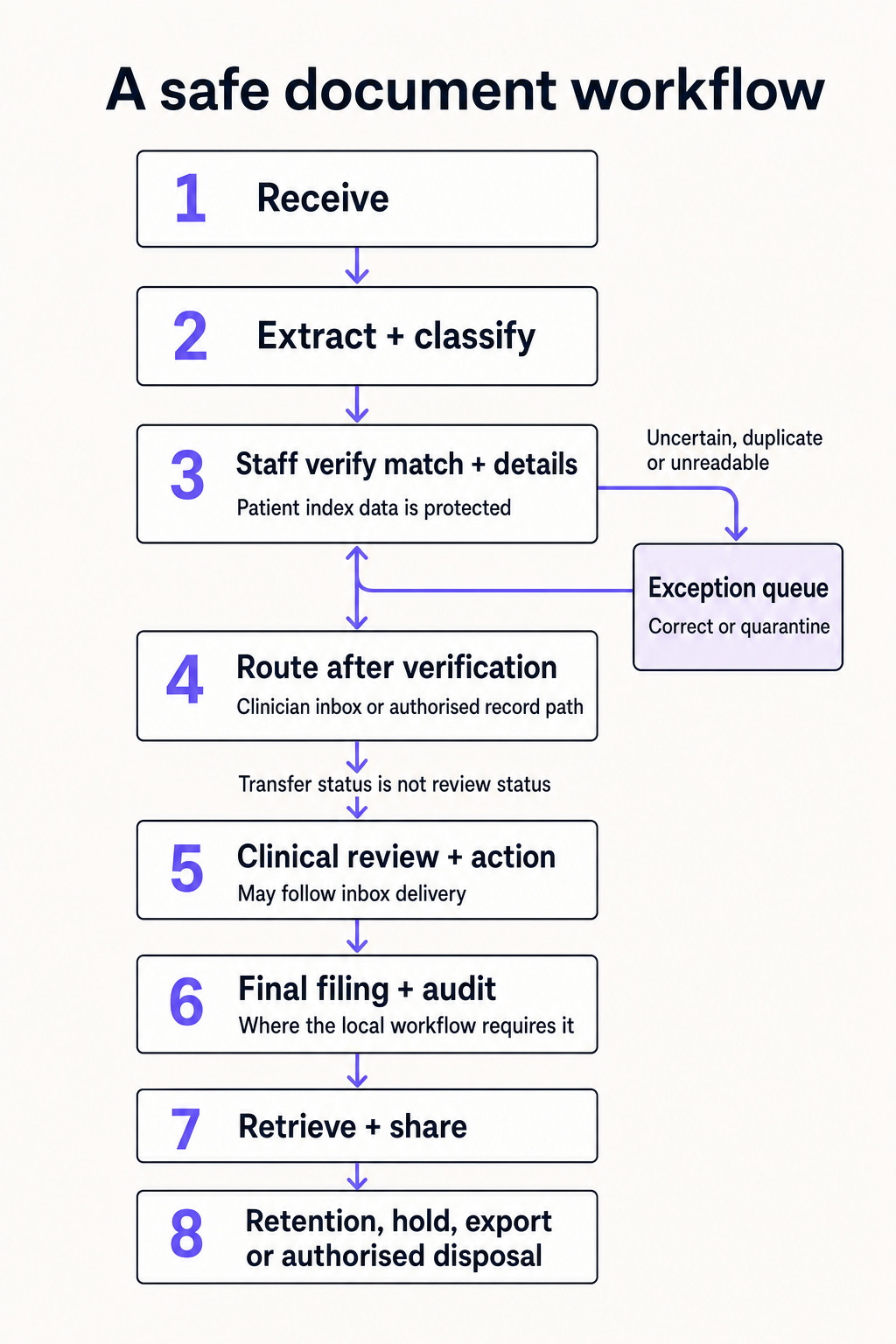
- Receive the document. Record each approved intake channel, such as secure email, scanner, upload or system import. Keep enough source information to trace where the document came from.
- Extract and classify. OCR or another tool may suggest the document type, patient details, author, date and destination. Treat these values as suggestions until the relevant checks pass.
- Verify the patient match and document details. Before routing, an authorised staff member checks the proposed patient, document type, source, date, responsible clinician and destination. Compare more than a name, define the required identifiers and detect duplicates or documents that refer to more than one person.
- Resolve exceptions, then route. Send uncertain, duplicate, unreadable or unexpected documents to a visible exception queue. Staff correct the item and verify it again, or quarantine it. Route only a verified document to the clinician's inbox or another authorised patient-record path.
- Complete clinical review and action. The responsible clinician or team may review the content after it reaches the clinician's inbox. A successful send confirms transfer to the recorded destination; it does not show that clinical review or the required action is complete.
- Confirm final filing and audit status. Where inbox delivery is an intermediate stage, keep clinical review before final filing. Where the local workflow permits a verified document to go directly to the patient record, define how clinical review and action are assigned and tracked there. Reconcile each send with the destination, final category, status and audit history.
- Retrieve and share under access controls. Staff should find the document by the fields they use in care, while role-based permissions and audit logs govern viewing, editing, export and sharing.
- Apply the approved lifecycle. Retain, hold, export, de-identify or dispose of the document according to the organisation's records authority and applicable law.
Quarantine in this workflow means keeping an unresolved item out of the clinical record while preserving it for authorised investigation. It is not a silent deletion step. Wrong-patient filing, an unexplained missing item, a failed write to the destination or a transferred document with no accountable review status should stop the workflow and remain visible to an owner.
Decide whether you need a dedicated DMS
The right product scope follows the gap you have documented.
Use existing clinical-system functionality when it already captures the required document types, supports safe patient matching and review, records useful audit history and meets retrieval and lifecycle needs. Buying another repository can add duplicate records and another access path without improving control.
Add a focused intake or filing tool when the main problem is a high-volume manual step and the clinical system remains the correct destination. The add-on still needs staff verification before routing, clear exception handling, a distinct clinical-review status, reconciliation and downtime procedures.
Consider a dedicated healthcare DMS when documents cross several sites, teams or repositories, or when the organisation needs configurable metadata, shared work queues, version control, broad search, granular permissions, records holds, governed disposal and reliable export.
Consider wider EDRMS or content-governance capability when patient documents are only part of the scope and the organisation must also govern policies, contracts, workforce files, finance records or other corporate information. Keep patient-record access and clinical responsibility distinct from corporate records administration.
If the immediate project is converting a paper archive, plan that work separately. Our guide to scanning medical records covers preparation, quality checks and import reconciliation. An archive conversion and an ongoing incoming-document workflow can share a destination while needing different controls and staffing.
What to ask vendors to demonstrate
Use representative documents from your own workflow, with personal information removed or replaced for the demonstration. Include a clear referral, a poor scan, a duplicate, two patients with similar details, an unmatched patient, a multi-patient document and an integration outage.
| Selection area | What the demonstration should prove |
|---|---|
| Scope and fit | The exact document types, sites, roles and clinical or administrative workflows included. Ask whether the product is a repository, a clinical-system module, an EDRMS or a point solution. |
| Capture and retrieval | Every supported intake path, searchable metadata, OCR behaviour on your common forms, accessibility and the steps needed to find a document during care. |
| Patient and document matching | The fields used, confidence signals, duplicate controls, handling of changed demographics and the route for low-confidence or conflicting matches. |
| Human control | Who verifies the patient match and document details before routing, who can correct or quarantine an exception, and who owns clinical review and action after delivery. Confirm that clinical review occurs before final filing where the local workflow requires a separate final-filing stage. |
| Integration | The exact Australian clinical systems and versions supported, data direction, fields and formats, destination, authentication, outage behaviour, retries, duplicate prevention and reconciliation. Confirm that transfer status remains separate from clinical-review status. An application programming interface (API) or standards claim does not prove the whole workflow works. |
| Access and audit | Least-privilege roles, multifactor authentication, privileged support access, version history and logs for view, edit, match, file, export, share and deletion events. |
| Security and resilience | Encryption in transit and at rest, patching, vulnerability handling, isolated backups, tested restoration, incident support and responsibility for breach assessment and notification. |
| Lifecycle and exit | Configurable retention rules, holds, authorised disposal, usable bulk export, metadata preservation, migration support and evidence of contract-end deletion across production and backup copies where applicable. |
| Operations and cost | Implementation, configuration, integration, migration, training, storage, support, upgrades and exit costs. Ask which work remains with your team after go-live. |
Require written answers for any control that cannot be shown. Certifications and architecture diagrams can support due diligence, but they do not show whether the configured workflow files the right document into the right record.
Protect Australian privacy, security and retention boundaries
Private health service providers across Australia are covered by the federal Privacy Act regardless of business size. Public providers sit under different state or territory arrangements, and private providers in New South Wales, Victoria and the Australian Capital Territory also have state or territory health privacy obligations. The OAIC jurisdiction overview explains these boundaries.
Australian Privacy Principle (APP) 11 requires reasonable technical and organisational steps to protect personal information from misuse, interference, loss and unauthorised access, modification or disclosure. When information is no longer needed, APP 11 generally requires reasonable steps to destroy or de-identify it. That requirement does not apply where the personal information is contained in a Commonwealth record, or where an Australian law or a court or tribunal order requires the entity to retain it. For an organisation where no exception applies, reasonable steps extend to all copies it holds, including archived and backup copies. OAIC APP 11 guidance gives the full scope and exceptions.
There is no single national medical-record retention period to enter into every system. Periods depend on the jurisdiction, provider and record type. The OAIC gives seven years, or until a child turns 25, as examples for some records in the ACT, NSW and Victoria, rather than a rule for every Australian service. Set retention and disposal rules with your privacy or records adviser against the laws and authorities that apply to your organisation. OAIC health-record guidance outlines the jurisdictional dependency.
Australian data residency is useful information, but it does not establish compliance on its own. Map the storage and processing locations, vendor and subprocessor access, remote support, encryption, backup regions, breach responsibilities, retrieval and deletion for each data type. APP 8 generally requires reasonable steps before disclosing personal information to an overseas recipient, subject to its scope and exceptions. A tightly controlled overseas contractor may sometimes be treated as use rather than disclosure when the customer retains effective control. OAIC APP 8 guidance explains that distinction.
For cyber controls, the Australian Signals Directorate's Essential Eight provides a useful baseline covering areas such as patching, multifactor authentication, restricted administrative privileges and backups. It is a risk-management baseline, not a healthcare compliance certificate. Set the target controls according to the sensitivity, scale, environment and consequences of loss or unauthorised access.
Implement the workflow, not only the software
Assign a clinical owner, an operational owner, a privacy or records owner and a technical owner before configuration starts. Then move through a controlled implementation:
- Baseline the current process. Measure incoming volume, queue age, rework, duplicates, exceptions and retrieval problems by document type. Do not use time saved as the only outcome.
- Define acceptance rules. Specify mandatory metadata, match evidence, staff verification before routing, separate transfer and clinical-review statuses, review roles, filing destinations, escalation times, audit events and stop conditions. A wrong-patient filing should be a stop condition in testing, not an acceptable average.
- Configure with representative users. Include reception, records staff, clinicians, privacy or governance staff and information technology (IT). Test permissions with real roles rather than a shared administrator account.
- Test the full path and its failures. Run common documents and edge cases from intake to destination. Disconnect the integration, create a duplicate, restore a backup and export a sample with metadata. Confirm how the team reconciles every item after downtime.
- Pilot a bounded queue. Start with named document types, sites and users. Keep the existing fallback available until the pilot meets its acceptance rules and staff can manage exceptions.
- Train by responsibility. Staff need to know how to correct and escalate, clinicians need to know where review and sign-off occur, and system owners need to monitor access, queues, integration failures and lifecycle actions.
- Monitor after go-live. Track unresolved exceptions, queue age, duplicates, destination failures, access anomalies, retrieval performance and user-reported hazards. Review controls after workflow, vendor or integration changes.
The National Archives also treats implementation as a change-management exercise requiring time, people, integration planning and user involvement. The software can enforce a well-designed process, but it cannot decide who owns a clinically significant exception.
When the gap is incoming filing in Bp Premier
For practices using Bp Premier, our Document Sorter is a focused intake-and-filing option. Documents can arrive through email, desktop-folder drop or upload, including batches. Lyrebird proposes patient, date-of-birth and clinician fields with confidence scores, plus a patient match and filing category. Staff review, edit and confirm the patient and document details before sending the item to the Doctor's Inbox or patient record. Each send records its destination and status, which confirms the transfer rather than the clinician's subsequent review or action.
Document Sorter requires a Bp Premier integration and a Lyrebird account. It addresses incoming-document review and filing. It is not a general records repository, enterprise EDRMS or retention and disposal authority, so practices with broader lifecycle needs should assess those separately.
If incoming document review and filing in Bp Premier is the gap you need to solve, Contact us.